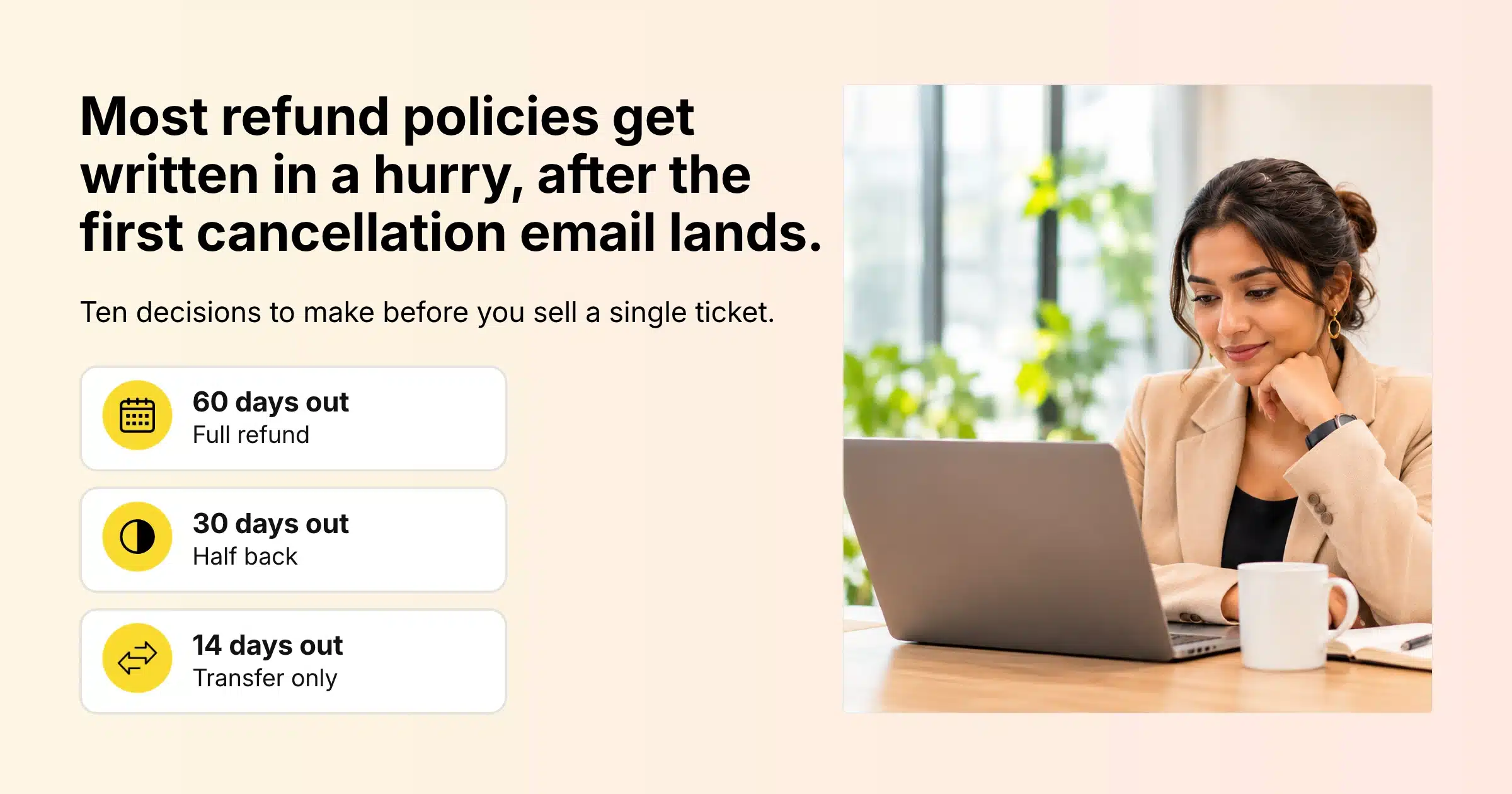
Most organisers write their refund policies in a hurry. The first cancellation email arrives, someone on the team searches for “standard refund terms”, and a policy appears that nobody thought through. By then you have already sold tickets under rules that were never written down, so every request turns into a small negotiation.
An event refund policy is the set of rules that tells buyers whether they can get their money back, how much, and until when. A cancellation policy covers the other side of the deal: what you, the organiser, owe ticket holders if you cancel, postpone or move the event online. Together they protect your budget, give your team one answer to repeat, and tell buyers exactly what they are signing up for before they pay.
This guide covers the ten decisions to make before tickets go live, a sample refund schedule, where the policy should appear, how to run refunds, transfers and date changes in Gevme Registration, and a policy template you can adapt for your own event.
Key Takeaways
- Write your event refund policy before the first ticket is sold, because buyers are bound by the terms shown at the time they paid.
- Tie refund deadlines to your real costs, such as catering numbers, venue guarantees and badge printing, so each cut-off date protects money you have already committed.
- Offer ticket transfers as a standard option, since a name change keeps the revenue and fills the seat.
- Decide in advance what happens if you postpone, cancel or move the event online, and say how long ticket holders have to ask for their money back.
- Publish the policy in at least three places: the registration page, the registration form and the confirmation email.
- Refund the amount the buyer actually paid, so early bird and promo code buyers get back their discounted price.
- In Gevme, record every refund against its order so your revenue reports and check-in lists stay accurate.
Why the Policy Needs to Exist Before the First Sale
The terms a buyer sees at checkout are the terms they agreed to. If your registration page says nothing about refunds, you have very little to point to when someone asks for their money back the week before the event. Changing the rules halfway through sales creates two groups of buyers on two sets of terms, which is hard to explain and harder to track.
A written policy also keeps your team consistent. Without one, the answer a buyer gets depends on who opens the email. One coordinator says yes, another says no, and the two buyers compare notes on LinkedIn. With a policy, everyone gives the same answer and points to the same page.
Finance benefits too. Refunds touch your payment gateway, your revenue reports and your attendee numbers. When the rules are clear, your team can process and record every refund the same way, and month-end reconciliation stops being a guessing game.
One practical note before you start: consumer protection rules differ by country, and some places give buyers rights that your policy cannot remove. Have someone familiar with the rules where you sell tickets read the final wording.
The 10 Decisions to Make Before Tickets Go on Sale
1. Will Tickets Be Refundable at All?
This is the first fork in the road, and there are four common answers:
- Fully refundable until a set date. Common for paid conferences and training courses with long sales periods.
- Partly refundable on a sliding scale. The refund shrinks as the event gets closer and your costs become fixed.
- Non-refundable but transferable. Buyers cannot get money back, but they can pass the ticket to a colleague.
- Non-refundable and non-transferable. Usually reserved for heavily discounted tickets or small, personalised experiences.
Most business events land on the second or third option. A sliding scale feels fair to buyers, and transfers mean that a cancelled place rarely becomes an empty seat. Fully non-refundable terms can work for low-priced tickets, but on a ticket worth several hundred dollars they make some buyers hesitate at checkout.
2. Set Your Refund Deadlines Around Real Costs
Refund deadlines should follow the dates when your money gets locked in. Look at your supplier contracts and note when you confirm final catering numbers, when the venue guarantee applies, when badges and printed materials go to print, and when you pay speakers or hotel blocks. Each of those dates is a natural cut-off.
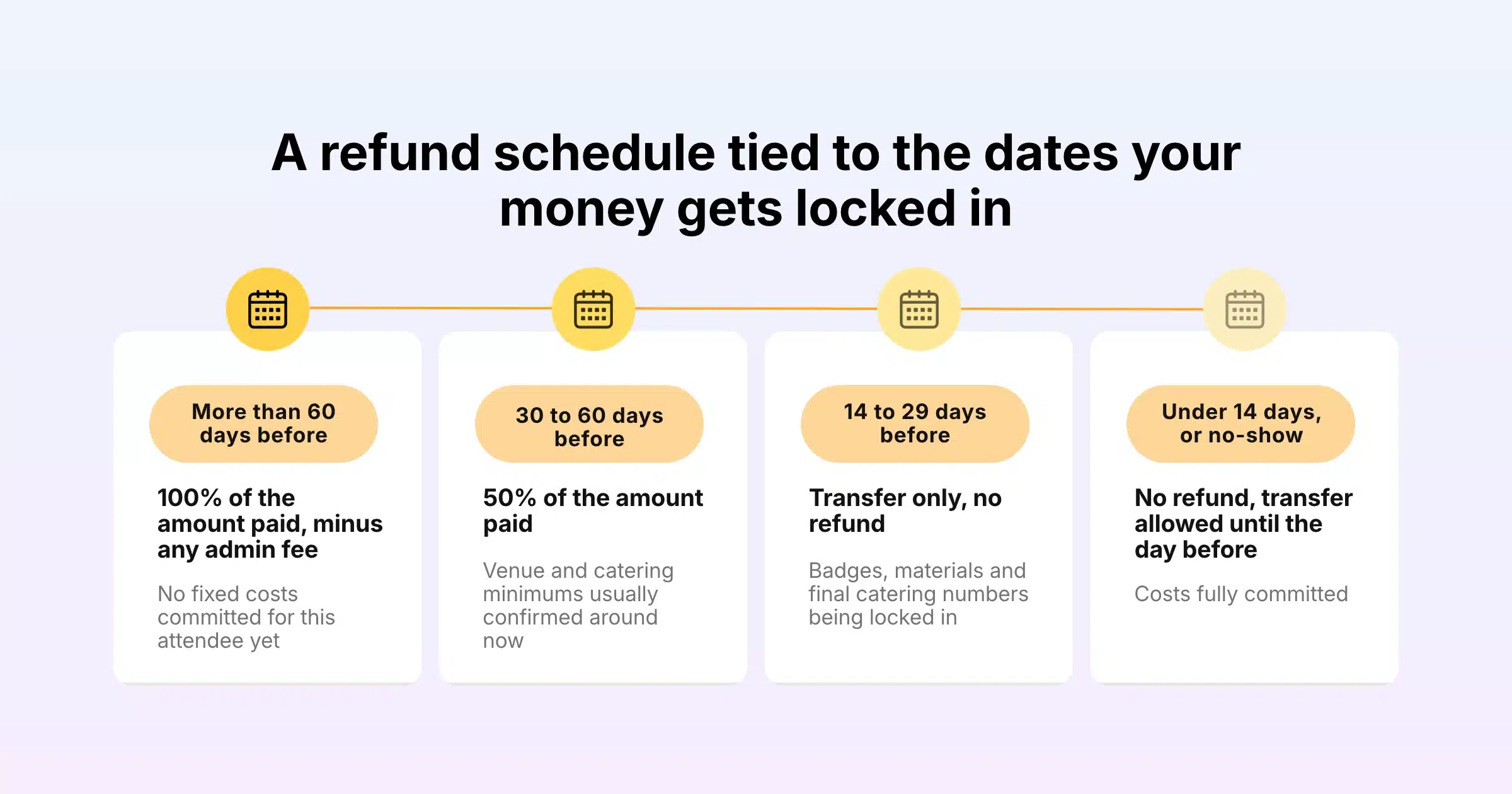
Here is a sample schedule for a two-day paid conference. Adjust the dates and percentages to your own contracts.
| When the request arrives | Refund amount | Why this cut-off |
|---|---|---|
| More than 60 days before the event | 100% of the amount paid, minus any admin fee | No fixed costs committed for this attendee yet |
| 30 to 60 days before | 50% of the amount paid | Venue and catering minimums usually confirmed around now |
| 14 to 29 days before | Transfer only, no refund | Badges, materials and final catering numbers being locked in |
| Less than 14 days before, or no-show | No refund, transfer still allowed until the day before | Costs fully committed |
Keep the schedule short. Four rows are easy to read on a phone. Ten rows with different rules for every ticket type will generate more questions than they answer.
3. Decide Whether to Keep an Admin Fee
Many organisers keep a small fixed amount on every refund to cover payment processing and staff time. Check what your payment gateway does with its own fee when you refund a card payment, because many processors keep their processing fee even when the ticket price goes back to the buyer.
If you keep a fee, state it as a fixed amount or a clear percentage, and say whether it applies to transfers as well. Buyers accept a fee they were told about. They push back on one that appears for the first time in the refund email.
4. Offer Transfers as a Standard Alternative
A transfer, sometimes called a substitution or name change, lets a buyer who can no longer attend hand their place to someone else. For corporate attendees this solves most problems: the company already paid, and a colleague takes the seat.
Transfers are usually the best outcome for everyone. You keep the revenue, the seat stays filled, and the buyer avoids losing their money. Decide how late you will accept a transfer (many events allow it until the day before) and whether the new person can change ticket type.
In Gevme Registration, organisers with the Manage Attendees permission can transfer a ticket from the attendee grid. You enter the new person’s first name, last name and email, update other form fields if needed, and choose whether to send a confirmation email to the new attendee. Gevme cancels the original attendee, creates a new record with a new ticket number, and logs the change. If the original attendee has already checked in or logged in, Gevme asks you to confirm before going ahead.
5. Plan for Group Orders
Group bookings raise a specific question: what happens when one person in a group of five drops out? Decide whether that single place gets a partial refund, a transfer to a colleague, or nothing at all.
In Gevme, cancelling an order cancels every attendee under that order. So when one person in a group booking can’t make it, transferring their ticket to a colleague is the cleaner route. If nobody can take the place and your policy allows a refund, record a partial refund against the order for that ticket’s value.
6. Refund What Was Actually Paid on Discounted Tickets
Early bird tickets, promo codes and partner discounts all mean buyers paid different amounts for the same seat. Your policy should say that you base refunds on the amount actually paid, after discounts. Otherwise a buyer who used a 30% code could argue for a refund of the full ticket price.
Some organisers also make heavily discounted tickets non-refundable but transferable. That is fair as long as you state it clearly next to the discounted ticket itself, so buyers see it before they apply the code.
7. Decide What You Owe If You Cancel the Event
If you cancel, ticket holders expect a full refund. Your policy should confirm that, say how quickly you will process refunds, and state what is not covered, such as travel and hotel costs that buyers booked themselves. Most organisers commit to refunds within a fixed number of business days after the cancellation announcement.
It also helps to say how you will tell people. “We will email every ticket holder at the address used to register” removes a lot of anxiety when something does go wrong.
8. Decide What Happens If You Postpone or Change the Format
Postponements are where vague policies cause the most trouble. Decide three things in advance:
- Tickets automatically carry over to the new date.
- Ticket holders who can’t attend the new date get a set window, for example 14 days from the announcement, to ask for a refund.
- If the event moves online or becomes hybrid, say whether in-person ticket holders can switch to virtual access, get a partial refund for the difference, or both.
When a date changes, Gevme’s order transfer feature can move an existing order from one event to another without creating a new order by hand. You choose the destination event, map each ticket to the matching ticket type there, update buyer or attendee details if needed, and choose whether to send updated tickets and confirmation emails. Gevme cancels the original order with a tracking note, and the order appears in the new event. This is an add-on that the Gevme team enables for your event or organisation through cs@gevme.com or your account manager.
Format changes are easier when the platform already supports every format. Gevme runs virtual events and hybrid events with a single registration page that can offer a physical or a digital track, so switching ticket holders to online access does not mean starting registration from scratch.
9. Set Your Refund Timeline and Method
Tell buyers how long a refund takes and where the money goes. The usual promise is a refund to the original payment method within a set number of business days of approval. If some buyers paid by bank transfer or cheque, say how you handle those refunds, because you can’t simply reverse them on a card.
Your payment setup affects this, so check it before you write the policy. Gevme Registration supports card payments through more than 20 payment gateways, as well as bank transfer, cheque, pay at the event and Gevme Pay. Each route returns money a little differently, which the Gevme section below covers.
10. Decide on No-Shows, Late Requests and Exceptions
No-shows normally receive no refund, and your policy should say so in plain words. Decide also how you will handle requests that arrive after a deadline for reasons outside the buyer’s control, such as a medical emergency or a cancelled flight.
Many organisers keep the written policy firm and give one named person the authority to approve exceptions case by case. That person might offer a transfer to a future edition of the event, a credit, or access to session recordings. The point is that exceptions are deliberate decisions made by one person, and they never become the default.
Your Pre-Sale Policy Checklist
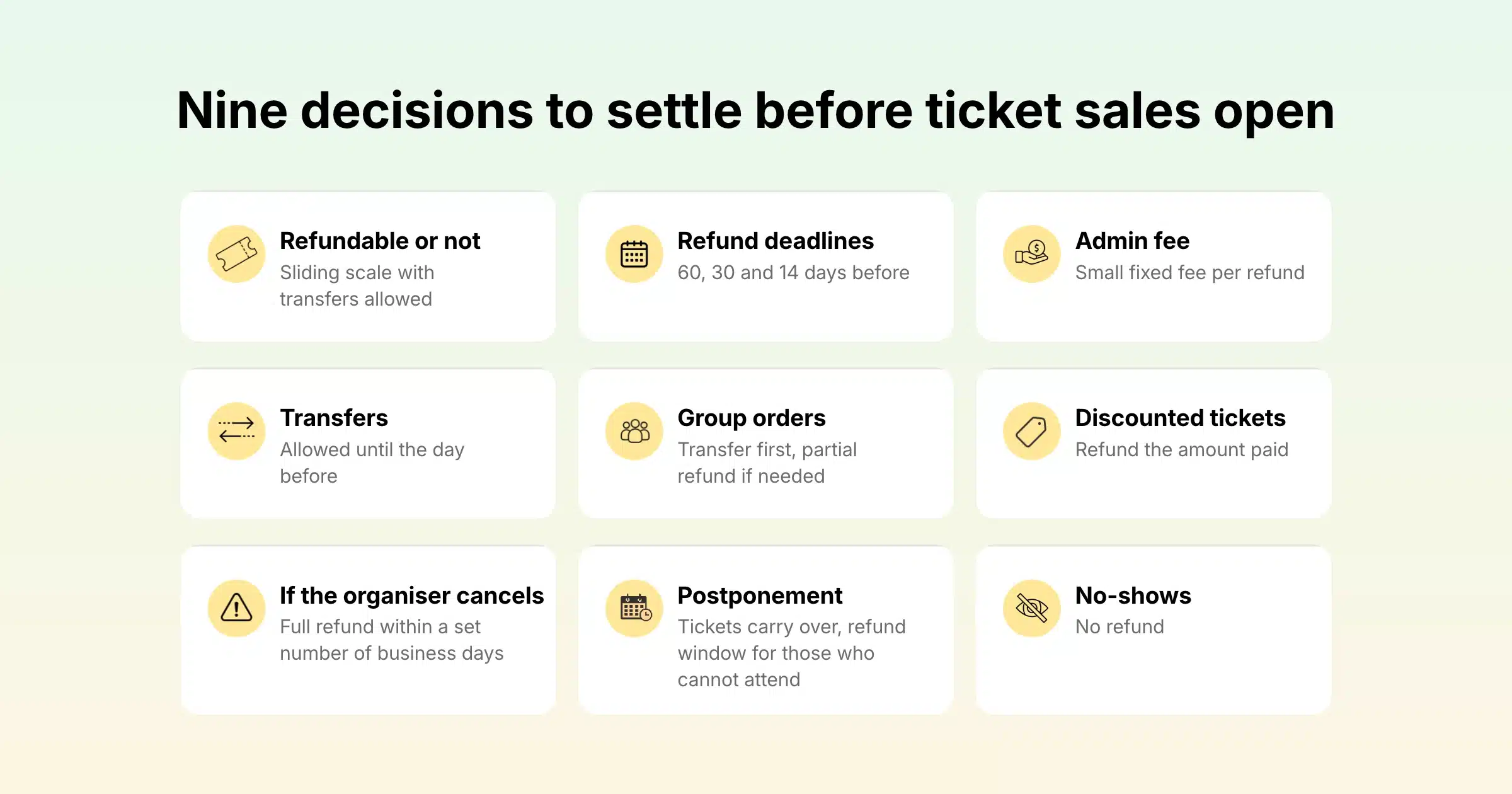
Use this table to confirm each decision before you open ticket sales.
| Decision | Common choice for paid business events | Where it lives in Gevme |
|---|---|---|
| Refundable or not | Sliding scale with transfers allowed | Ticket descriptions and registration page |
| Refund deadlines | 60, 30 and 14 days before the event | Policy text on the page and in the confirmation email |
| Admin fee | Small fixed fee per refund | Stated in the policy; recorded as part of the refund amount |
| Transfers | Allowed until the day before | Transfer option in the attendee grid |
| Group orders | Transfer first, partial refund if needed | Order details screen |
| Discounted tickets | Refund the amount paid | Promo codes and ticket settings |
| Organiser cancels | Full refund within a set number of business days | Cancel order, then record the refund |
| Postponement | Tickets carry over, refund window for those who can’t attend | Order transfer between events (add-on) |
| No-shows | No refund | Policy text |
Where to Publish Your Refund Policy
A policy only works if buyers see it before they pay. Put it in at least these places:
- The registration page or event website. Add a short summary near the ticket list and link to the full policy. If you build your event site on Gevme’s event website builder, a dedicated FAQ or policy page takes a few minutes to add.
- Each ticket description. If a ticket type has different terms, such as non-refundable early bird tickets, say so right next to that ticket.
- The registration form. Add a compulsory field asking buyers to confirm they have read the refund and cancellation policy. Gevme’s form builder supports compulsory fields, so the order can’t go through until the buyer confirms.
- The confirmation email. Repeat the key dates in a short line, with a link to the full policy. People search their inbox for this when plans change.
- Invoices and receipts. Gevme attaches invoices and receipts to confirmation emails, so corporate buyers have the terms alongside the paperwork their finance team needs.
Running Refunds, Transfers and Date Changes in Gevme Registration
Once the policy is live, the next job is handling requests quickly and recording them properly. Here is how each step works in Gevme Registration, Gevme’s event registration and ticketing software.
Cancelling an Order
Open Orders, select the order and click Cancel Order. If the order was paid, Gevme then asks whether you want to issue a refund to the buyer. You can also select several orders in the orders grid and cancel them together.
Cancelling an order also cancels every attendee under that order. The order moves to the Cancelled/Deleted Orders list and the attendees move to the Cancelled/Deleted Attendees list, so the records stay available for reporting. Nobody can use a cancelled ticket to check in at the door, which keeps your onsite check-in list accurate on the day.
Cancel and delete are two different actions. Cancelling an order keeps the buyer’s contact record. Deleting it removes the attendees and deletes or rolls back the matching contacts. For a refund, cancel the order. Use delete only for test orders or genuine duplicates.
Recording a Refund
Open the order, click Transaction in the toolbar and choose Refund. In the New Transaction – Refund window you fill in:
- Date: the date the refund is recorded.
- Type: the refund method, for example Cash, Cheque, Offline Credit Card, PayPal, PayNow, Telegraphic/Bank Transfer, Stripe Checkout or Gevme Payment Gateway.
- Amount: the full or partial amount you are returning.
- Description: optional, useful for a cheque number or bank reference.
- Printout Note: optional, shown on the transaction printout.
Leave “Create a matching credit transaction” ticked so the refunded amount is offset against the order balance. The one exception is refunding a duplicate payment, where you leave it unticked because a valid payment already exists on the order. The full steps are in the refunding a buyer guide.
How the Money Gets Back to the Buyer
What happens after you record the refund depends on how the buyer paid.
| How the buyer paid | What happens when you record the refund in Gevme |
|---|---|
| Stripe Checkout | Gevme processes the refund in Stripe automatically, creates the refund record, checks the refundable balance to prevent over-refunding, and warns you if the refund may already have been processed in Stripe |
| Gevme Pay | The refund is created with a Pending Approval status. Send the Event ID and Order ID to the Gevme Finance team, who verify, approve and process the refund |
| Other card gateways | You return the money through your own gateway account, and the Gevme record keeps your order and payment history accurate |
| Bank transfer, cheque, cash or PayNow | You return the money directly to the buyer, and record the transaction in Gevme with its reference |
Put the expected timing for each route into your policy, so buyers who paid by bank transfer know their refund will take longer than a card refund.
Transferring a Ticket to Someone Else
Select a single attendee in the attendee grid and choose Transfer. Enter the new attendee’s first name, last name and email, which are the three compulsory fields, and use Show More to update any other form answers. Tick the option to send the confirmation email to the new attendee so they receive their own e-ticket. Gevme cancels the original attendee, creates the new record and ticket number, and keeps a log of the change for future reference.
Moving Orders to a New Date
For a postponed event, set up the new event first with matching ticket types and make sure those tickets are in an active sales period with enough availability. If public sales should stay closed, extend the sales period and set the ticket visibility to Hidden, so the transfer can go through without the tickets appearing for sale. Then open each order in the original event, choose Transfer Order, select the destination event, map the tickets and confirm. You can also apply a promo code to the destination order if the new date has a different price.
Keeping Your Numbers Straight
When you pull revenue figures after refunds, export both the Completed orders and the Cancelled/Deleted Orders lists. Gevme removes cancelled orders and their attendees from the active lists, so a revenue export from completed orders alone won’t show what was refunded. Gevme’s registration reports cover tickets, orders and attendees, and export to CSV for your finance team.
Larger events with many ticket tiers benefit most from this kind of record-keeping. NRF 2025 Retail’s Big Show Asia Pacific ran registration for 9,500 attendees on Gevme with multi-tier ticketing and add-ons, which is exactly the kind of setup where clear refund records save hours at reconciliation time.
A Refund and Cancellation Policy Template You Can Adapt
Copy this, replace the bracketed details with your own, and have it checked against the consumer rules where you sell.
Refunds. Requests received more than [60] days before [Event name] receive a full refund of the amount paid, less a [USD 25] administration fee. Requests received [30 to 60] days before the event receive a [50%] refund of the amount paid. From [29] days before the event, tickets are non-refundable but you can still transfer them.
Transfers. You can transfer your ticket to another person at no charge until [the day before the event]. Email [contact email] with the new attendee’s full name and email address, and we will send them their own ticket.
Discounted tickets. We base refunds on the amount you paid after any discount or promo code. [Early bird tickets are non-refundable but transferable.]
No-shows. Tickets that are not used on the day are not refundable.
If we cancel. If we cancel [Event name], every ticket holder will receive a full refund of the amount paid within [10] business days of the announcement. We are not responsible for travel or accommodation costs.
If we postpone or change the format. If the event moves to a new date, your ticket will automatically be valid for the new date. Anyone who can’t attend can request a full refund within [14] days of our announcement. If the event moves online, [you will receive virtual access and a refund of the price difference].
How refunds are paid. Refunds are made to the original payment method within [10] business days of approval. Refunds for bank transfer payments are made to the account you provide.
Contact. Send all refund and transfer requests to [contact email], quoting your order number from your confirmation email.
A Few Terms Worth Knowing
- Refund window: the period during which a buyer can cancel and receive some or all of their money back.
- Transfer (substitution): moving a ticket from the original attendee to a new person, without a refund.
- Chargeback: when a buyer disputes a card payment with their bank and the payment is reversed, usually with a fee charged to the seller.
- Order transfer: moving a whole order, with its tickets, from one event to another, typically after a postponement.
Pro Tip
Before tickets go on sale, run a test order through every refund path you plan to use. Buy a ticket with a promo code, cancel it, record a partial refund, transfer a ticket in a group order, and then export your reports. Fifteen minutes of testing shows you exactly what your team will see when real requests arrive, and it reveals any gap in the policy wording while it is still cheap to fix.
Frequently Asked Questions
An event refund policy should include refund deadlines, the refund amount at each stage, any admin fee, whether transfers are allowed, how discounted tickets are treated, what happens to no-shows, and how and when refunds are paid. It should also cover what you owe ticket holders if you cancel, postpone or change the format of the event.
In many places a no-refund policy is allowed for event tickets, provided it is clearly shown before purchase. Some countries give buyers rights that a policy can’t remove, especially when the organiser cancels the event, so have the final wording checked against the consumer rules where you sell.
A refund policy explains what buyers get back when they choose not to attend. A cancellation policy explains what the organiser owes buyers when the organiser cancels, postpones or changes the event. Most events publish both together as one page.
Yes, allowing transfers is one of the most useful parts of any refund policy. The seat stays filled, you keep the revenue, and the buyer doesn’t lose money. In Gevme Registration, organisers can transfer a ticket from the attendee grid and send the new attendee their own confirmation email.
Let tickets carry over to the new date automatically, and give ticket holders a fixed window, such as 14 days from the announcement, to ask for a refund if they can’t attend. In Gevme, the order transfer add-on moves existing orders to the new event without recreating them.
Gevme processes refunds automatically when the original payment was made through Stripe Checkout and you choose Stripe Checkout as the refund method. Refunds for Gevme Pay orders are processed by the Gevme Finance team after you submit them. For other payment methods, you return the money directly and Gevme keeps the record.
Display it on the registration page, next to any ticket type with different terms, as a compulsory confirmation field on the registration form, and in the confirmation email. Attaching invoices to confirmation emails also keeps the terms with the buyer’s payment records.
Conclusion: Decide Once, Then Let the System Carry It
A refund policy is a set of decisions you make once, while you still have time to think: which costs each deadline protects, how transfers work, what happens to group bookings and discounted tickets, and what you owe people if the plan changes. Make those decisions before the first sale, publish them where buyers will see them, and test every refund path before real requests arrive.
Gevme Registration gives you the tools to run that policy day to day: ticket transfers, order cancellation, refund records for every payment method, automatic refunds through Stripe Checkout, order transfers between events and reports that keep finance happy. If you want to see how it would work for your next event, request a demo and the Gevme team will walk you through it.