If you’ve ever sat through a post-show debrief trying to explain why the booth cost more than the leads were worth, this one’s for you. Exhibitors need to tell their VP of marketing the airfare and the badge fee paid off. Organizers need to convince sponsors that a logo on a lanyard actually reached the right people. And sponsors want a number for the slide, not a shrug and “people seemed pretty engaged.”
Here’s the problem: trade show and conference ROI has always been slippery to pin down. A stack of business cards from the booth tells you very little. It won’t say who walked the floor, who sat through your session, or which names turned into a real sales conversation. Instead, attendance and interest end up scattered across systems: one spreadsheet for registrations, one app for badge scans, one CRM for whatever happens after. By the time anyone tries to stitch it together, the event is old news and the numbers are shaky.
Lead capture and attendance tracking software exists to close that gap. Done well, it turns badge scans, session check-ins, and booth interactions into one trail of data you can actually report on. What follows looks at what lead capture and attendance tracking software do, and how the two feed an ROI report. It also compares Gevme’s approach with Cvent, Swapcard, Bizzabo, and EventsAIR, then sets out a workable method for calculating ROI once the show is over.
Key Takeaways
- Lead capture (badge or QR scanning plus qualification questions) and attendance tracking (check-in and session data) are two different systems. They need to work together to produce an ROI report worth reading.
- A lead only counts once someone has scored or qualified it. Raw scan totals inflate the “leads” number without saying which ones are actually sales ready.
- Exhibitor and sponsor portals that show real-time lead counts and engagement data give sponsors a reason to renew. That matters as much to organizers as it does to the exhibitors themselves.
- Session attendance and engagement data, poll responses, Q&A activity, dwell time, are useful ROI signals. They still count on sessions where nothing got sold on the spot.
- Most vendors here, including Cvent, Bizzabo, and EventsAIR, keep their core platform pricing quote based. Budget conversations therefore usually start with a demo instead of a price list.
- Gevme keeps registration, check-in, and virtual engagement data in one system. As a result, a lead scanned at a booth and an attendee who joined a session show up in the same report instead of two.
- To prove ROI, tie captured leads and attendance data back to cost per lead, pipeline value, and a qualification bar everyone agreed on before the event, not after.
Why Trade Show ROI Is So Hard to Pin Down
Your Badge Scanner Doesn’t Talk to Your CRM
A typical trade show throws off data across at least three separate systems. There is a registration platform for who signed up, a badge scanner or lead retrieval app for who visited a booth, and a CRM for whatever happens after. None of these were built to talk to each other by default. An exhibitor can therefore walk away with 300 scanned contacts and no way to sort them. Which ones sat through a keynote, attended a relevant session, or asked a question that signals intent?
Not Every Registrant Is a Lead
Registration numbers look great in the recap deck. But someone who registers, badges in, and never leaves the coffee area isn’t worth the same as someone who sat through three sessions and stopped at five booths. Treating every registrant as equally valuable is a common reason ROI numbers look inflated on paper. Three months later, the same numbers look disappointing in the pipeline.
A Lead Scanned in March Doesn’t Close Until August
B2B sales cycles rarely wrap up inside conference week. A lead captured at a booth in March might not become a closed deal until August. By then nobody remembers which event sourced it, unless someone tagged the original scan with an event ID and pushed it into the CRM at the time. Skip that step and marketing ends up guessing at attribution from vague notes or someone’s memory of who they talked to on day two.
What Lead Capture Software Actually Does
Badge and QR Scanning
At its core, lead capture software replaces the paper business card. An exhibitor scans an attendee’s badge, printed QR code, or NFC card with a phone or a dedicated scanner. The attendee’s registration details then populate instantly on the exhibitor’s device. That means name, company, title, and sometimes contact info, depending on what they consented to share. This baseline function shows up across every platform in this space, Gevme’s own leads scanning app for exhibitors included.
Qualification Questions and Lead Scoring
A scanned badge on its own is just a name. The useful layer sits above it: qualification. Booth staff answer custom questions on the spot (“Budget confirmed?” “Timeline?” “Decision maker?”) and those answers attach to the lead record. Some platforms push further with scoring models that rank leads by likelihood to convert. A sales team can therefore call the hottest leads first instead of working an alphabetical list. Cvent’s LeadCapture tool, for example, lets exhibitors add custom qualification questions and rate leads in real time so teams can prioritize follow-up, per Cvent’s own LeadCapture page, checked September 2026.
Exhibitor and Sponsor Portals
Most serious lead capture tools now ship with a dashboard exhibitors and sponsors log into during and after the event. There they see their own captured leads, export them, and, in the better implementations, view engagement metrics beyond a raw scan count. Gevme’s exhibitor tools give organizers the same dashboard view exhibitors see. There’s no back and forth over what a sponsor actually captured, as described on Gevme’s exhibitors and sponsors page.
What Attendance Tracking Actually Does
Check-In Data
Attendance tracking starts at the check-in moment: who showed up, at what time, through which entry point. Basic stuff, but it’s the foundation everything else sits on. A registration count tells you who intended to come. Check-in data tells you who actually did. That is the number a sponsor cares about when they ask how many real people walked past their booth.
Session-Level Attendance Analytics
Beyond the front door, attendance tracking extends into individual sessions. It records who scanned into which talk, how long they stayed, and whether they ducked out early. For an organizer trying to prove content value to a co-located sponsor track, this is often more persuasive than overall headcount, because it shows which topics actually pulled a room.
Engagement Scoring
The most useful attendance systems go a step further and turn behavior into a score. Session check-ins, poll responses, Q&A participation, app logins, and booth visits all roll into one engagement number per attendee. Onsite and virtual engagement overlap heavily here, because a virtual attendee’s poll response or chat activity is just as measurable as an in-person badge scan. Gevme tracks this kind of activity across both formats, since registration, check-in, and the virtual venue share one attendee record. The ecosystem page describes that as the Host, Run, and Prove stages of a single event lifecycle.
How Lead Capture and Attendance Tracking Connect to ROI Reporting
Lead and attendance data only become an ROI story once someone combines them and reports against a cost baseline. The chain that usually matters looks like this:
- Cost per lead. Total exhibit or sponsorship spend divided by the number of qualified, not raw, leads captured.
- MQL conversion. Of the leads captured, how many clear the bar to be called a marketing qualified lead, meaning a sales team would actually want to work them. MQL stands for marketing qualified lead, a term covered in the glossary below.
- Pipeline value. Once leads land in the CRM, what dollar value of open opportunities traces back to the event.
- Engagement-to-conversion correlation. Whether attendees with higher engagement scores (multiple sessions, booth visits, poll participation) convert at a higher rate than low-engagement registrants. This number often justifies content investment on its own, separate from booth spend entirely.
Where Exhibitor ROI Dashboards Fit
This is also where exhibitor ROI dashboards earn their place. Cvent built its exhibitor portal specifically to give exhibitors “intuitive reporting capabilities to accurately measure and evaluate ROI,” per Cvent’s LeadCapture page, checked September 2026. The same page cites a customer example, Merkle, generating 6,000 marketing qualified leads, 9,000 new database leads, and $1 million in pipeline from LeadCapture data. Swapcard takes a similar approach with its Exhibitor Center. That view surfaces lead quality scores and pipeline estimates directly in the exhibitor’s own dashboard, per Swapcard’s Exhibitor Center page, checked September 2026.
Meanwhile, EventsAIR bundles a revenue tracking dashboard into its sponsorship and exhibitor management tools. Organizers can therefore watch sponsor and exhibitor sales performance in real time, per EventsAIR’s sponsorship and exhibitor management page, checked September 2026. It includes this at no extra cost as part of its lead capture feature set, per EventsAIR’s lead capture page, checked September 2026.
Some organizations also need to measure broader event outcomes beyond exhibitor pipeline, things like attendee satisfaction or knowledge transfer. For that, Gevme’s ecosystem partner ImpactAIQ handles outcome and impact measurement alongside the core registration and lead data.
Feature-by-Feature Comparison: Gevme, Cvent, Swapcard, Bizzabo, and EventsAIR
This isn’t a full platform shootout. It’s scoped narrowly to lead capture, attendance tracking, and ROI reporting, because that’s the specific slice most people researching this topic actually need to compare.
Gevme
Gevme covers badge scanning through its exhibitor leads scanning app, interactive virtual booths with chat, polls, Q&A, product showcases, and livestreaming for hybrid and virtual formats. It also gives organizers a dashboard that mirrors exactly what exhibitors see. No discrepancy therefore creeps into reported numbers, all confirmed on Gevme’s exhibitors and sponsors page, checked September 2026. Because registration, onsite check-in, and the virtual venue run on the same attendee data, engagement scoring carries across formats instead of resetting for each channel. That matters for any organizer running a hybrid program through Gevme’s onsite event registration services and virtual event builder side by side.
Cvent
Cvent offers badge and business card scanning through LeadCapture, with custom qualification questions and real-time lead scoring. It adds an Exhibitor Portal built around ROI reporting, per Cvent’s own LeadCapture page, checked September 2026. The same page’s Merkle case study reports 6,000 MQLs, 9,000 new database leads, and $1 million pipeline. That is the strongest published proof point of any vendor covered here for this capability set.
Swapcard
Swapcard leans heavily on AI for this part of the stack. Its Exhibitor Center uses behavioral data (session attendance, profile views, registered interests) to recommend high-potential leads and supports custom scoring fields, per Swapcard’s Exhibitor Center page, checked September 2026. Swapcard also sells sponsored ads and homepage placements as monetization add-ons through the same dashboard. Pricing is set annually by attendee volume, with tiers such as Starter and Professional scaling into an unlimited Enterprise tier. No flat dollar figures appear on the pricing page itself, per Swapcard’s pricing page, checked September 2026.
Bizzabo
Bizzabo captures leads via QR code scanning through its mobile app, or through its Klik SmartBadge hardware for tap-based capture. The platform adds lead scoring, custom qualification questions, and a sponsor portal that exports full lead lists as CSV, per Bizzabo’s lead capture app page, checked September 2026. Bizzabo’s core Event Experience OS costs $499 per user per month, billed annually with a three user minimum. That works out to roughly $17,999 per year at the minimum tier. Klik SmartBadge hardware and premium add-ons like advanced onsite capabilities remain quote based, per Bizzabo’s pricing page, checked September 2026.
EventsAIR
EventsAIR includes lead capture as a built-in feature of its Attendee App, with barcode or QR scanning, custom qualification questions, and a self-service exhibitor portal for managing captured leads. The company states plainly that this is bundled into the platform at no additional cost, per EventsAIR’s lead capture page, checked September 2026. Its separate sponsorship and exhibitor management tools add an interactive floor plan for booth selection. They also add a real-time revenue tracking dashboard for organizers, per EventsAIR’s sponsorship and exhibitor management page, checked September 2026. EventsAIR’s own pricing (Single, Multi, and Enterprise tiers) is quote based with no numbers listed on the site, per EventsAIR’s pricing page, checked September 2026.
A Few Terms Worth Knowing
- MQL (Marketing Qualified Lead): A lead that has met criteria (job title, engagement level, stated intent) suggesting they’re worth handing to sales, as opposed to a name captured with no further context.
- Lead scoring: Assigning a numeric or tiered value to a captured lead based on qualification answers, engagement behavior, or both, so sales teams know who to call first.
- Badge scanning: Using a phone, dedicated scanner, or NFC reader to pull an attendee’s registration data from their badge or QR code instead of manually collecting a business card.
- Engagement analytics: Data on what an attendee actually did at an event, sessions attended, polls answered, booths visited, used to gauge interest level beyond simple attendance.
- Exhibitor ROI dashboard: A reporting view, usually inside an exhibitor or sponsor portal, that turns raw lead and attendance data into cost-per-lead or pipeline-facing metrics.
- Check-in data: The record of who physically or virtually entered an event or session, timestamped, forming the base layer for any attendance tracking system.
Comparison Table
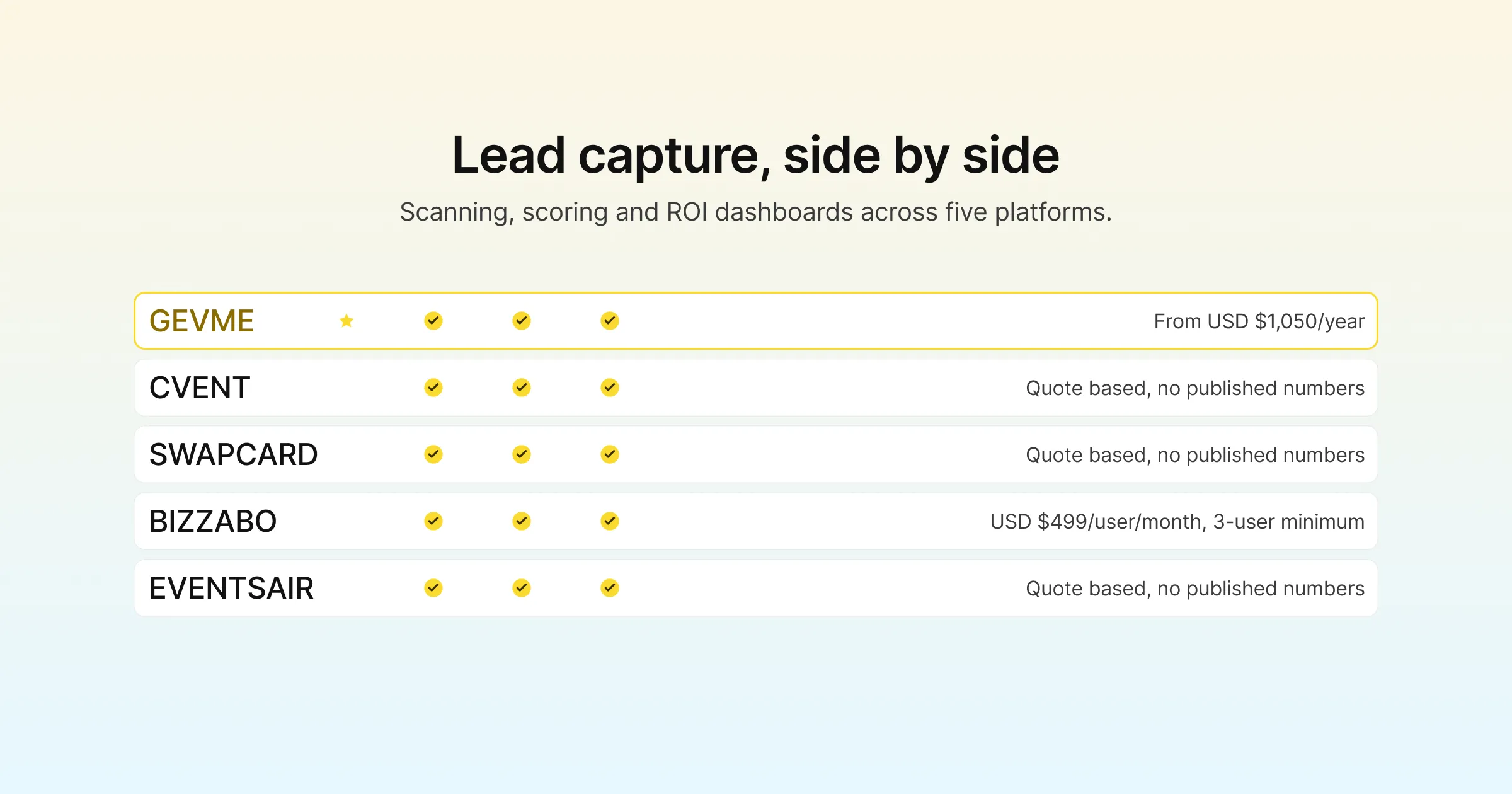
| Platform | Badge/QR Lead Scanning | Lead Qualification & Scoring | Virtual Booth Engagement Tools | Exhibitor/Sponsor ROI Dashboard | Starting Price |
|---|---|---|---|---|---|
| Gevme | Yes, via leads scanning app | Yes, custom qualification through exhibitor tools | Yes, chat, polls, Q&A, product showcases, livestream | Yes, organizer sees exhibitor’s own dashboard view | Registration and virtual venue plans from USD $1,050/year, attendee add-ons from USD $2.10 |
| Cvent | Yes, badge and business card scan | Yes, custom questions and real-time scoring | Available on request | Yes, Exhibitor Portal with ROI reporting | Available on request |
| Swapcard | Yes, via Exhibitor Center | Yes, custom scoring fields plus AI-recommended leads | Available on request | Yes, lead quality scores and pipeline estimates | Quote based, no published numbers |
| Bizzabo | Yes, QR scan or Klik SmartBadge | Yes, lead scoring and custom qualification questions | Available on request | Yes, sponsor portal with CSV export | USD $499/user/month, 3 user minimum (about USD $17,999/year) |
| EventsAIR | Yes, via Attendee App | Yes, custom qualification questions | Available on request | Yes, real-time revenue tracking dashboard | Quote based, no published numbers |
How to Actually Calculate and Prove ROI
Most of the ROI math below is not complicated. What trips people up is doing it in the right order, and doing it at all once the excitement of the show wears off.
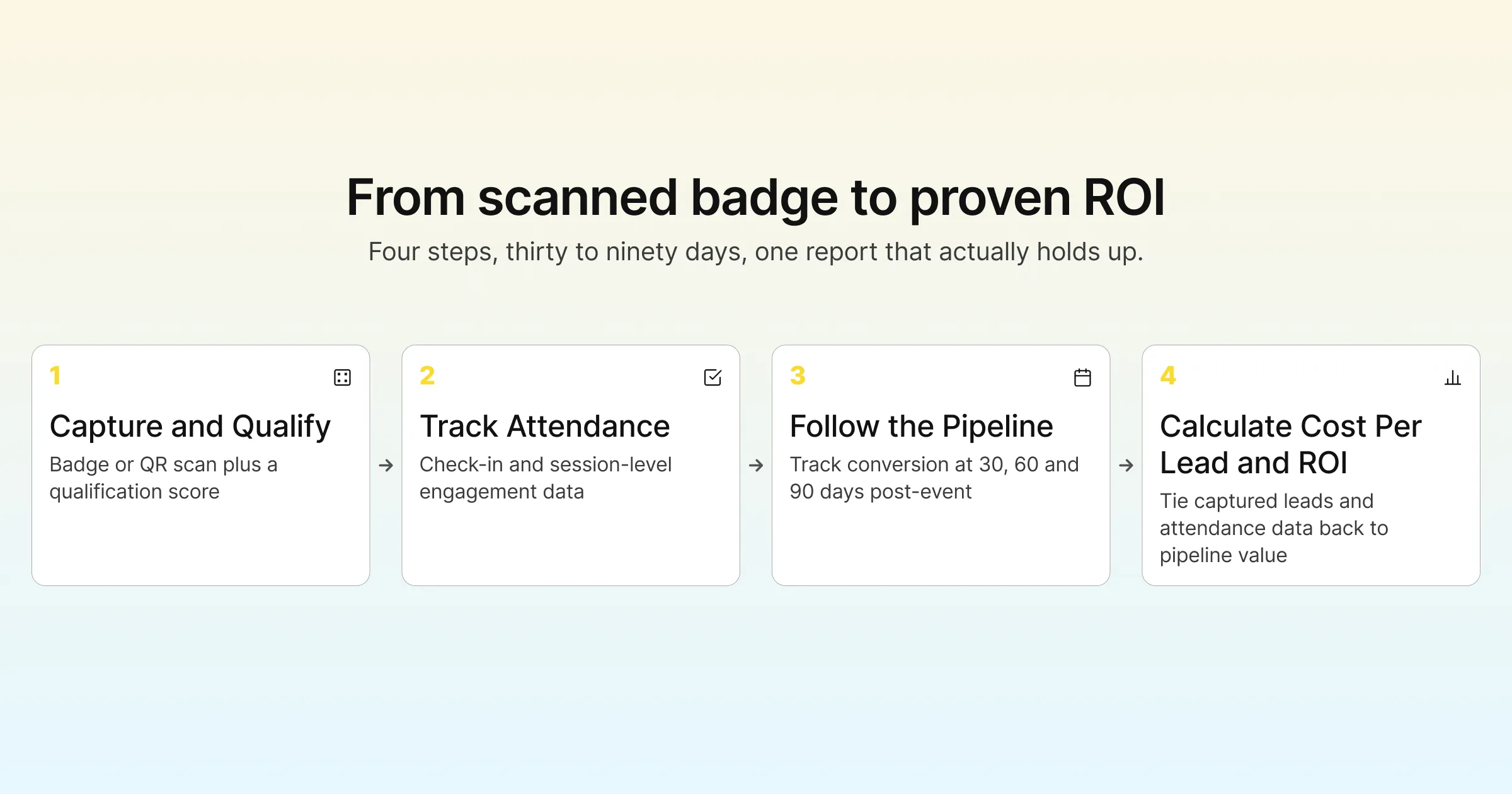
- Set the qualification bar before the event, not after. Agree with sales on what counts as a qualified lead (job title, budget confirmation, specific interest) so the number you report isn’t just a raw scan count dressed up.
- Tag every captured lead with the event ID at the point of capture. This single habit is the biggest reason event attribution falls apart months later. If your CRM integration doesn’t stamp the source event automatically, do it by hand before the leads leave the exhibitor portal.
- Pull attendance and engagement data alongside lead data, not separately. A lead who attended three sessions and asked a question in Q&A is a different prospect than one who scanned in and left. Export both data sets together if your platform allows it.
- Calculate cost per qualified lead. Total spend (booth, staff travel, sponsorship fee) divided by qualified leads, never total scans. This single number is usually the fastest way to compare one event against another.
- Track pipeline value at 30, 60, and 90 days post-event. Sales cycles run long. A single post-show report undercounts the real value, so check back at intervals to see what actually converted.
- Report engagement correlation alongside lead count. If attendees with higher engagement scores close at a meaningfully higher rate, that correlation is what justifies next year’s sponsorship level, well beyond the raw number of badges scanned.
Pro Tip
Before you sign a new lead capture tool for your next trade show, ask the vendor exactly where the qualification data goes after the event. Ask too how it maps to your CRM’s lead fields. A tool that scans beautifully but dumps a spreadsheet someone has to reformat and upload by hand will cost your sales team hours it doesn’t have. By the time the data’s usable, the leads have gone cold. The best test is to ask for a sample export before you sign, not after.
Frequently Asked Questions
They’re generally used interchangeably in event technology. Both refer to scanning an attendee’s badge or QR code to capture their contact and registration details at a booth, session, or sponsor activation, rather than manually collecting a business card.
Yes, though badge scanning is the most reliable method. Some platforms track attendance through app check-ins, session QR codes, or manual sign-in sheets. However, these are slower and leave more gaps than a badge or QR scan tied straight to the registration record.
Start with total spend (booth, staff, travel, sponsorship fee) divided by qualified leads captured, not raw scans. Then track how many of those leads convert to pipeline over the following 30 to 90 days, since most B2B sales cycles don’t close during the event itself.
MQL stands for marketing qualified lead, meaning a contact who has met criteria suggesting they’re ready for a sales conversation. It matters for events because reporting total scans without this filter overstates the value of a booth or sponsorship, since not every scanned badge represents real buying intent.
Most established platforms, including Gevme, Cvent, Swapcard, Bizzabo, and EventsAIR, offer some form of CRM export or integration for captured leads. Depth varies quite a bit, so it’s worth confirming during a demo whether the integration is a native two-way sync or just a manual CSV export.
It varies widely. Some vendors, like Bizzabo, publish a per-user monthly rate. Others, including Cvent, Swapcard, and EventsAIR, keep pricing quote based and tied to event size or attendee volume. Gevme publishes starting annual prices for its registration and virtual venue plans on its pricing page.
The mechanics differ (a QR scan at a physical booth versus a click or chat interaction in a virtual booth) but the goal is the same: capturing interest and qualifying it. Platforms built for both formats on shared attendee data, rather than treating virtual as an afterthought, tend to produce cleaner combined engagement reporting for hybrid events.
Conclusion: Picking a Lead Capture and ROI Stack That Actually Reports What You Need
Every platform covered here handles the basics of lead capture and attendance tracking reasonably well. Cvent has the strongest published case study evidence for exhibitor ROI reporting. Swapcard’s AI-driven lead recommendations are a genuinely useful shortcut for busy booth staff. Bizzabo’s Klik SmartBadge makes physical lead capture feel less transactional. EventsAIR bundles solid lead capture and revenue tracking tools into its core platform without charging extra for them. Anyone shortlisting vendors for this specific use case should look closely at all four.
Gevme’s place on that shortlist comes down to how it handles events running across onsite and virtual formats at the same time. Registration, on-site check-in and badging, and the virtual venue all share the same attendee record. As a result, a lead scanned at a physical booth and an attendee who joined a session remotely both land in one combined engagement report. That is what the Host, Run, Prove ecosystem is built around. It matters most for conference organizers running hybrid formats, where sponsors expect one clean ROI number at the end rather than two reports stapled together. If proving ROI at your next trade show or conference is the problem sitting on your desk right now, see how this works for your event by requesting a demo.