For many attendees, the event does not really end until the certificate arrives. A nurse logging professional development hours, a lawyer tracking training for the year, a manager who needs to show their employer where the conference budget went: all of them need proof they were there. When that proof takes weeks to arrive, or has to be chased by email, it leaves a sour note on an event that otherwise went well.
In short, a certificate of attendance is a document that confirms a named person attended a specific event, session or training on a given date. It records attendance only. However, it does not confirm that the person passed a test or learnt a skill, which is what separates it from a certificate of completion or a formal qualification. For organisers, sending these certificates is mostly a data problem: knowing exactly who attended, then getting a correct, personalised document to each of them quickly.
This guide covers what a certificate of attendance is and how it differs from similar certificates, what to include on one, how to decide who qualifies, when to send it, a ready-to-use certificate of attendance template, a step-by-step way to automate the whole process and how to set it up in Gevme.
Key Takeaways
- A certificate of attendance confirms someone attended; it does not confirm learning or assessment, so word it accordingly.
- Decide eligibility rules before the event, such as checking in at the venue or attending a minimum number of sessions or minutes.
- Capture attendance accurately with QR check-in, session check-in and online attendance tracking, because the certificate is only as reliable as that data.
- Include the attendee’s full name, event name, date, location or format, organiser, any hours or credits, a signature and a unique certificate ID.
- Send certificates within one to three days after the event, while attendees are still engaged and before they start asking for them.
- Automate delivery by building a list of eligible attendees and scheduling a post-event email based on the event end date.
- Keep a record of every certificate issued so you can answer verification requests and reissue lost copies quickly.
What Is a Certificate of Attendance?
A certificate of attendance is a personalised document, usually a PDF, issued to someone who attended an event, class or training session. It states who attended, what they attended, when and who organised it. In practice, attendees use it to prove participation to employers, professional bodies or for their own records.
Certificate of Attendance vs Other Event Certificates
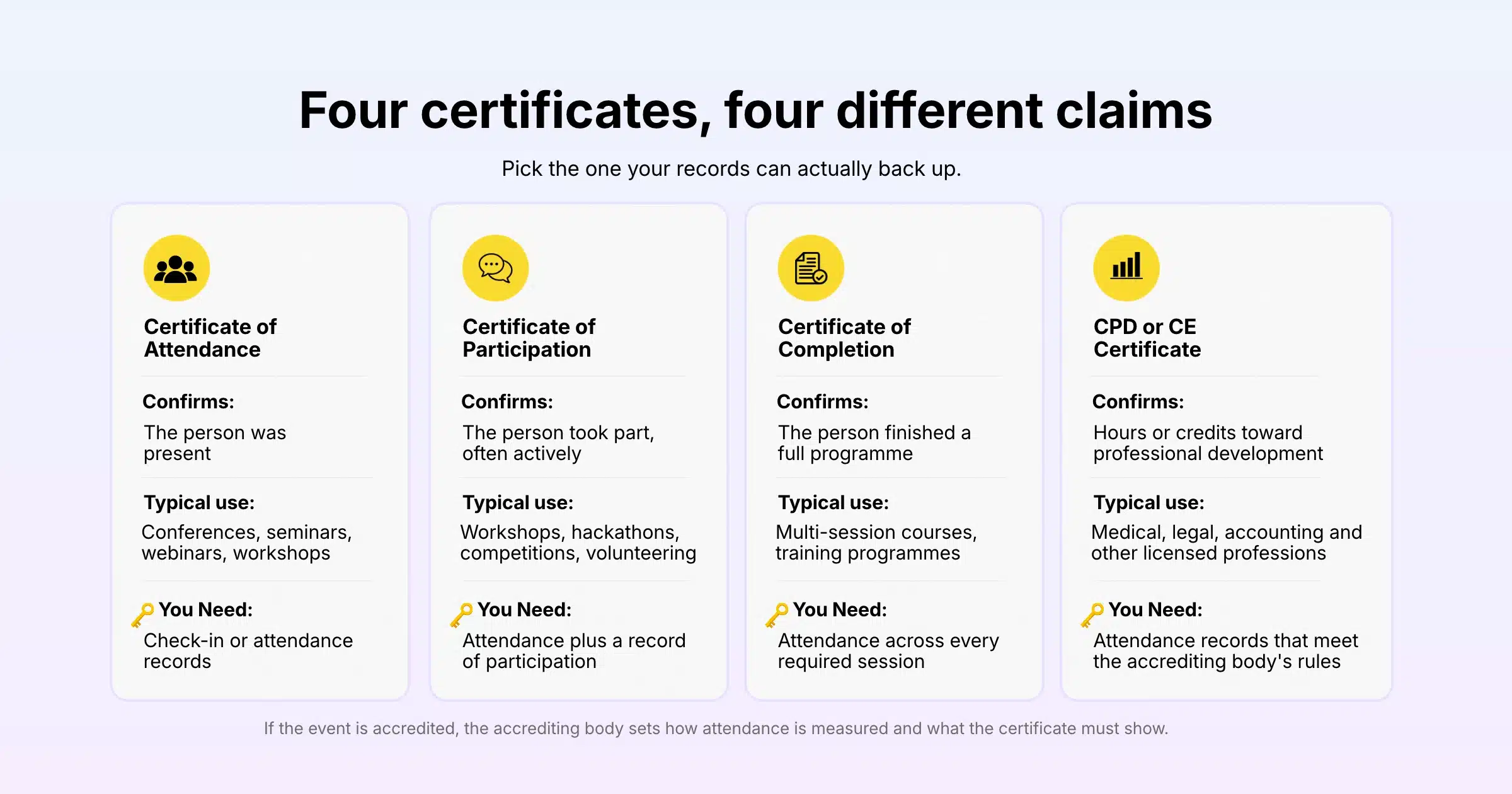
Event organisers issue several types of certificate, and the wording matters because each one makes a different claim. So choose the one that matches what you can confirm from your records.
| Certificate type | What it confirms | Typical use | What you need to verify |
|---|---|---|---|
| Certificate of attendance | The person was present | Conferences, seminars, webinars, workshops | Check-in or attendance records |
| Certificate of participation | The person took part, often actively | Workshops, hackathons, competitions, volunteering | Attendance plus a record of participation |
| Certificate of completion | The person finished a full programme | Multi-session courses, training programmes | Attendance across every required session |
| CPD or CE certificate | Hours or credits toward professional development | Medical, legal, accounting and other licensed professions | Attendance records that meet the accrediting body’s rules |
If your event offers continuing professional development (CPD) or continuing education (CE) credits, the accrediting body sets the rules for how attendance is measured and what the certificate must show. Check those rules before the event, because they may require session-level records, minimum attendance time or specific wording.
Why Attendees Want One
For example, attendees use certificates to log professional development hours, claim training against company budgets, support visa or employment applications and share achievements on professional profiles. For organisers, a prompt certificate is also a reason for attendees to come back to your communications after the event, which makes it a good moment to ask for feedback.
What to Include on a Certificate of Attendance
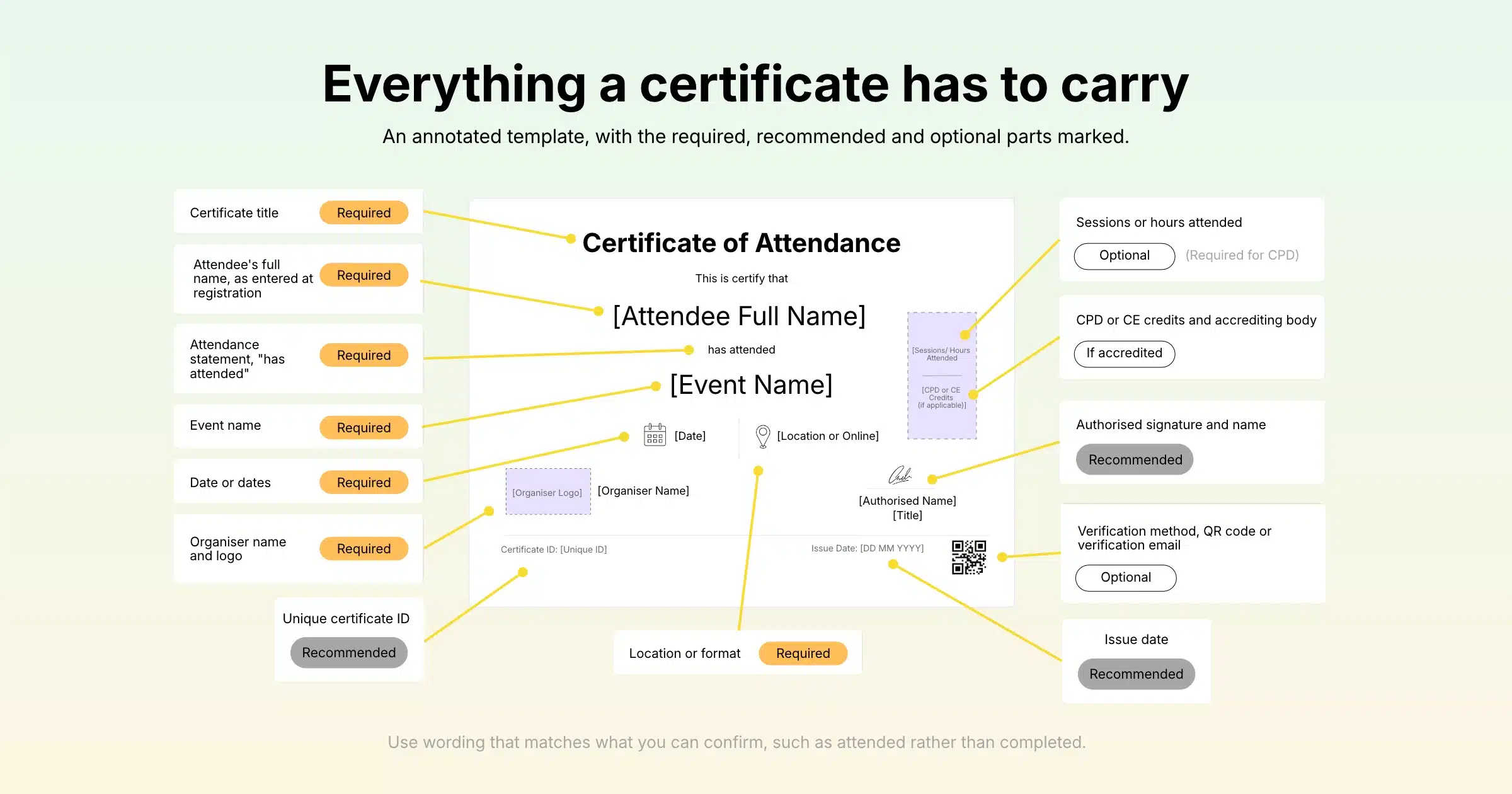
A certificate of attendance should include enough detail for someone else, such as an employer or professional body, to understand exactly what the person attended. Use this checklist when you design your template.
| Element | Example | Required or optional |
|---|---|---|
| Certificate title | Certificate of Attendance | Required |
| Attendee’s full name | As entered at registration | Required |
| Event name | Asia Healthcare Leaders Summit 2026 | Required |
| Date or dates | 14 to 15 October 2026 | Required |
| Location or format | Singapore, in person / Online | Required |
| Organiser name and logo | Your organisation | Required |
| Attendance statement | “has attended…” | Required |
| Sessions or hours attended | 6 hours, 4 sessions | Optional, required for CPD |
| CPD or CE credits and accrediting body | 6 CPD points, approved by [Body] | Only if accredited |
| Authorised signature and name | Programme Director | Recommended |
| Unique certificate ID | AHLS26-00451 | Recommended |
| Issue date | 16 October 2026 | Recommended |
| Verification method | QR code or verification email address | Optional |
Getting the Name Right
Above all, the attendee’s name is the detail most likely to go wrong, and the one people care about most. For this reason, pull it straight from the registration record, and consider adding a “name as it should appear on your certificate” field to your registration form for events where certificates matter. As a result, that one field avoids most reissue requests.
Wording That Matches What You Confirm
Use plain, accurate wording such as “This is to certify that [Name] attended [Event Name] held on [Date] in [Location].” Avoid words like “completed” or “qualified” unless you have the records to back them up.
Deciding Who Qualifies
Decide who qualifies for a certificate before the event, publish the rule on your event page and apply it the same way for everyone. Unclear rules are the main source of complaints after an event.
Common Eligibility Rules
- Checked in at the event: the simplest rule for single-day conferences and seminars.
- Attended a minimum number of sessions: useful for multi-track events and CPD programmes.
- Attended for a minimum time: common for webinars and virtual events, for example at least 75 percent of the session.
- Attended every day of a multi-day programme: typical for certificates of completion.
In-Person, Virtual and Hybrid Attendance
However, each format needs its own source of attendance data. In-person events rely on check-in at the registration desk and, where hours matter, check-in at each session. Meanwhile, virtual events rely on logins, viewing time or attendance in online meetings. Hybrid events need both, matched to the same attendee record so nobody receives two certificates or none at all.
When to Send a Certificate of Attendance
Send certificates of attendance within one to three days after the event ends. That is late enough for your team to confirm attendance data and still early enough that attendees have not started chasing you for them.
For single-session webinars, sending on the same day or the next morning works well. For multi-day conferences with CPD credits, allow time to check session records, but tell attendees during the closing session when certificates will arrive so they are not left guessing.
Pair the certificate with your thank you email or send it straight after, and include the feedback survey link. Attendees who open a certificate email are already engaged with your event, so it is one of the best moments to ask for feedback.
Certificate of Attendance Template
Use this certificate of attendance template as a starting point and adjust the wording to your event.
Certificate of Attendance
This is to certify that
[Attendee Full Name]
attended
[Event Name]
held on [Event Date or Dates] at [Venue, City / Online].
[Optional: The attendee completed [Number] hours across [Number] sessions. This event is accredited for [Number] CPD points by [Accrediting Body].]
[Signature]
[Signatory Name], [Title], [Organisation]
Certificate ID: [Unique ID] | Issued: [Issue Date]
Email to Send With the Certificate
Subject: Your certificate of attendance for [Event Name]
Hi [First Name],
Thank you for joining us at [Event Name]. Your certificate of attendance is attached. Please keep it for your records.
We would love to hear what worked and what we can improve. The survey takes about two minutes: [Survey link]
If any detail on your certificate needs correcting, reply to this email with your certificate ID and we will reissue it.
[Sign-off]
How to Automate Certificates of Attendance
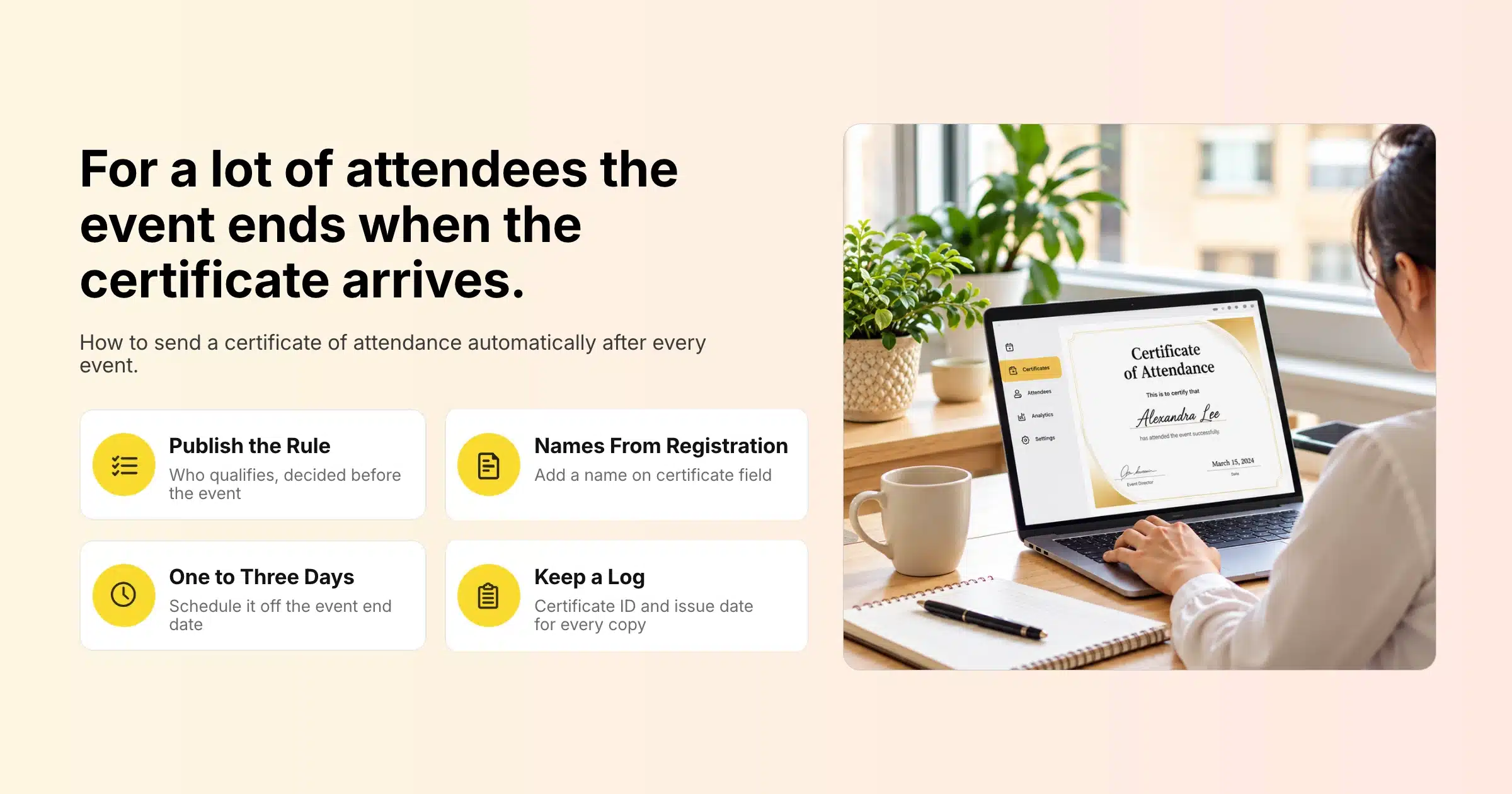
Automating certificates of attendance comes down to four steps: track attendance in your event platform, build a list of who qualifies, generate a personalised document for each person and schedule the email. Once you set it up for one event, you can clone the same flow for the next.
Step 1: Capture Attendance Accurately
Every certificate depends on attendance data, so start there. First, use QR code check-in at the entrance, and session check-in for any session that counts toward hours or credits. Similarly, for virtual sessions, use your platform’s attendance tracking. Avoid paper sign-in sheets, because typing them up afterwards is slow and error-prone.
Step 2: Build a List of Eligible Attendees
Then filter your attendee records by your eligibility rule (checked in, minimum sessions or minimum time) and save the result as a list. If your platform supports lists that update automatically, the list picks up late check-ins without anyone rebuilding it.
Step 3: Generate Personalised Certificates
Next, each certificate needs the attendee’s name and event details on your template. However, event platforms that generate personalised documents from registration data handle this automatically. Without that, teams usually export the attendee list and use a mail merge to create the PDFs, which works for small events but takes time at scale.
Step 4: Schedule the Delivery Email
Schedule the certificate email to go out a set time after the event ends, sent only to your eligible list. Also include the survey link and a simple way to request corrections.
Step 5: Keep a Record
Finally, store the list of certificates issued with each certificate ID and issue date. When someone asks for a copy a year later, or a professional body asks you to confirm a certificate, you can answer in minutes.
Setting Up Certificates of Attendance in Gevme
Gevme keeps attendance data, attendee records, personalised documents and email campaigns in one platform, which removes most of the manual work from sending certificates.
Track Attendance at the Door and in Each Session
Gevme’s onsite check-in works through web check-in, kiosks, phone check-in and QR code scanning, with self-serve and assisted modes. In addition, session check-in lets you track who attends each session, using the laptop, a phone scanner or a kiosk, and records check-in and check-out times for each attendee. After the event, those times are visible in the attendee grid, giving you a clear record for session-based or hours-based certificates. You can also restrict session check-in to attendees who registered for that session.
For virtual events, Gevme Omnichannel analytics show visits, time spent and active visitors, and online meeting attendance can be tracked, so remote attendees can be held to the same rules as those in the room. On hybrid events, confirmed registrations sync from Gevme Registration into Gevme Omnichannel in real time, so in-person and virtual attendance sits against the same attendee.
The NUS Postgraduate Fair 2024 used Gevme for a hybrid event of 1,077 attendees with QR check-in and dual livestreamed tracks, a typical setup where attendance has to be tracked both onsite and online.
Build a Smart List of Eligible Attendees
In Gevme Registration, a smart list is a saved search that updates in real time. First, search the attendee grid for the records that meet your rule, save the search as a smart list and use it as the audience for your certificate email. After that, the list automatically adds anyone who matches the criteria later.
Generate Personalised Certificates
Gevme can also generate and share personalised documents with attendees from their registration data, and participation certificates are one of the document types it supports, alongside visa letters and e-badges. Because the document draws on the registration record, the name on the certificate matches what the attendee entered, which is one more reason to add a “name on certificate” field to your form. You can see the full set of automation options on Gevme’s event booking automation page.
Schedule the Certificate Email
Gevme email campaigns can be scheduled based on a milestone, including your event end date, so your certificate email can be set up before the event and sent, for example, one day after it closes. Campaigns also support personalisation tags, saved templates and file attachments, and email statistics show who opened and clicked. If someone asks for their certificate again, you can select their record in the attendee grid and send them an individual email with the file attached.
Collect Feedback at the Same Time
Also add a Gevme Survey link to the certificate email. Surveys can have start and end dates, private access for invited respondents only and a full report you can export, so the certificate email doubles as your main feedback request.
Common Mistakes With Event Certificates
| Mistake | What happens | Fix |
|---|---|---|
| No published eligibility rule | Complaints from people who did not qualify | State the rule on the event page and in the closing session |
| Paper sign-in sheets | Typing errors and missing names | Use QR check-in and session check-in |
| Names copied from a separate spreadsheet | Misspelt names and reissue requests | Pull names from the registration record |
| Calling it a certificate of completion without records | Certificates that cannot be verified | Use “attendance” unless every requirement was tracked |
| Sending weeks later | Attendees chase you and lose interest | Schedule delivery for one to three days after the event |
| No certificate ID | Hard to verify or reissue | Add a unique ID and keep a log |
A Few Terms Worth Knowing
- CPD (continuing professional development): ongoing learning that many professions require members to log each year, often measured in hours or points.
- Session check-in: recording attendance at each individual session or room, in addition to the event entrance.
- Smart list: a saved search of attendees that updates itself as records change.
- Milestone scheduling: sending an email at a set time before or after a key date, such as the event end date.
Pro Tip
Add a “name as it should appear on your certificate” field to your registration form, make it compulsory for any event that issues certificates, and show attendees a short preview line on the confirmation page. People fill it in more carefully than the standard name field, because they know where it will be used. It removes most correction requests and means your automated certificates go out right the first time.
Frequently Asked Questions
A certificate of attendance is a document confirming that a named person attended a specific event, session or training on a given date. It proves presence at the event and does not confirm that the person passed an assessment or gained a qualification.
A certificate of attendance confirms that someone was present, while a certificate of participation usually signals that the person took an active part, such as presenting, competing or contributing to a workshop. Many organisers use the terms loosely, so pick the one that matches the records you keep.
A certificate of attendance should include the attendee’s full name, the event name, the date, the location or format, the organiser’s name and logo, and an attendance statement. For professional development, add the hours or credits, the accrediting body, an authorised signature and a unique certificate ID.
Certificates of attendance should be sent within one to three days after the event. Webinars can send them the same day or the next morning, while multi-day events with CPD credits may need a little longer to check session records.
Yes, you can send certificates of attendance automatically by tracking attendance in your event platform, saving a list of eligible attendees and scheduling a post-event email to that list. In Gevme, smart lists update in real time and email campaigns can be scheduled relative to the event end date.
Issue virtual and hybrid certificates using attendance data from the online platform, such as logins, viewing time or online meeting attendance, alongside onsite check-in for in-person attendees. Keep both on the same attendee record so each person receives one certificate based on a single rule.
A certificate of attendance counts toward CPD points only when the event is approved by the relevant professional body and attendance is recorded the way that body requires. Check the accrediting body’s rules before the event and include the credits and accreditation details on the certificate.
Conclusion: Make the Certificate Part of the Event
Ultimately, a certificate of attendance is a small document with a big effect on how attendees remember your event. To sum up, get the basics right: a published eligibility rule, accurate attendance tracking, names taken from the registration record, clear wording and delivery within a few days. Build the process once, and every event after that needs only a template update and a scheduled email.
Gevme connects the pieces that make certificates easy: check-in and session check-in at the venue, attendance tracking for virtual audiences, smart lists that update themselves, personalised documents built from registration data and email campaigns scheduled around your event end date. To see how it would work for your next conference or training programme, request a demo and our team will walk you through it.