Picture this: Your keynote speaker is ready. The coffee is hot. Your sponsors are set up. But half your attendees are stuck in a hallway, staring at the back of someone’s head while the line barely moves.
Long queues kill your event’s ROI. When attendees start their experience feeling annoyed, they’re less likely to engage with sponsors, network effectively, or attend future events.
The knee-jerk reaction is usually to throw more staff at the problem. But more hands often mean more confusion, higher costs, and minimal speed gains. The real issue isn’t staffing. It’s your system. By redesigning your check-in flow with smart technology like QR codes, kiosks, and better layout design, you can move crowds faster with fewer people. Here’s how to turn your entrance bottleneck into a smooth welcome.
Why Your Event Check-In Queues Happen in the First Place
Long lines aren’t random. They’re the result of predictable friction points in your process. Understanding the root causes helps you fix the right problems.
Manual Lookup Delays Eat Your Time
Watching a staff member scroll through a 500-row spreadsheet or flip through a binder to find “Kumar, Priya” is painful for everyone. Each name search takes 10-20 seconds. That might not sound like much, but here’s the math: if each attendee takes 15 seconds to process, a single desk can only handle 240 people per hour. When you have 1,000 attendees arriving in a 90-minute window, a queue is like guaranteed.
Peak Arrival Waves Crush Manual Systems
Events aren’t a steady stream. They’re a flood. Research shows that 70% of attendees typically arrive within 15 minutes of the opening session. Your manual check-in system might work fine for the first 50 people. But when 700 people show up in the same 15-minute window, even a well-trained team collapses under the surge.
Badge Hunting Slows Everything Down
If you’re pre-printing badges and organizing them alphabetically, you’re building delays into your own system. Staff spend 5-8 seconds per person hunting through boxes. When badges are misfiled or attendees registered under a company name instead of their own, that search time doubles.
Poor Layout Creates Clustering
When people walk into your lobby and don’t immediately see where to go, they cluster. They stop. They ask each other questions. This creates a bottleneck before anyone even reaches a check-in desk. If you don’t separate “ready to scan” attendees from “I have a problem with my registration” attendees, one confused person can hold up 50 people behind them.
The bottom line: Manual processing averages 15 seconds per guest, which caps you at 240 attendees per hour per desk. With just 2 self-service kiosks, you can process more people than 6 manual desks combined.
Pre-Event Fixes That Remove 50% of Your Check-In Delays
The secret to fast check-in isn’t what happens on event day. It’s what you do in the weeks before. You can essentially pre-process your crowd so that physical check-in becomes a two-second formality.
Most check-in delays start before anyone reaches your venue. Handling key steps in advance helps you eliminate the conditions that create queues.
Enable Pre-Registration and QR Tickets
Stop allowing on-site registration. Incentivize early sign-ups so that 90% of your attendee data is already in your system before doors open. Each person should receive a digital ticket that lives in their Apple or Google Wallet. This eliminates the “I registered but forgot my confirmation” problem entirely.
When attendees have their QR code stored on their phone, they’re not fumbling through emails or printing papers. They show up ready. QR codes also eliminate the need for staff to search through registration lists manually.
Use Timed Entry to Distribute Your Crowd Arrival
For conferences with 1,000+ attendees, timed entry is a game changer. Instead of everyone arriving at 8:45 AM for a 9:00 AM start, spread the surge. Offer early-bird networking sessions at 8:00 AM or specific workshop time slots. Some planners even assign entry windows by last name or ticket type.
The goal is simple: spread 1,000 arrivals over two hours instead of twenty minutes. Your check-in capacity stays the same, but you never hit the breaking point that creates a queue.
Send Your Attendees Their QR Code Before Event Day
Twenty-four hours before your event, send a “Know Before You Go” email. Make the QR code the hero of that message. Include parking details, entry point locations, and what to expect when they arrive.
When attendees walk up to your kiosks with their phone already out and the QR code pulled up, your staff’s job drops from “find, verify, print, explain” to a single two-second scan.
That 18-second time savings per person is the difference between a queue and smooth flow.
Pre-arrival communication like this has been shown to reduce confusion-driven slowdowns by up to 50%.
Technology That Speeds Up Your Event Entry Instantly
If you want to cut staff costs while increasing speed, you need to let technology do the heavy lifting. The three tools below replace manual processes with automated ones that work faster and more accurately.
Modern check-in technology means removing the tasks humans are slow at so your team can focus on hospitality.
QR Code Scanning vs Manual Search
Here’s the speed difference that matters: A manual name search takes 20-40 seconds. A QR code scan takes 2 seconds. By switching from search to scan, you increase your processing power by 10x without adding a single person.
Platforms like Gevme validate registrations in under 2 seconds, even when you’re offline. The QR code acts as a unique identifier that instantly pulls up the attendee’s record, confirms their ticket type, and triggers badge printing. No typing. No scrolling. No mistakes.
This speed boost is why QR-based check-in can process attendees several times faster than manual desks, often reducing check-in time to just 2 to 5 seconds per guest.
Self-Service Check-In Kiosks
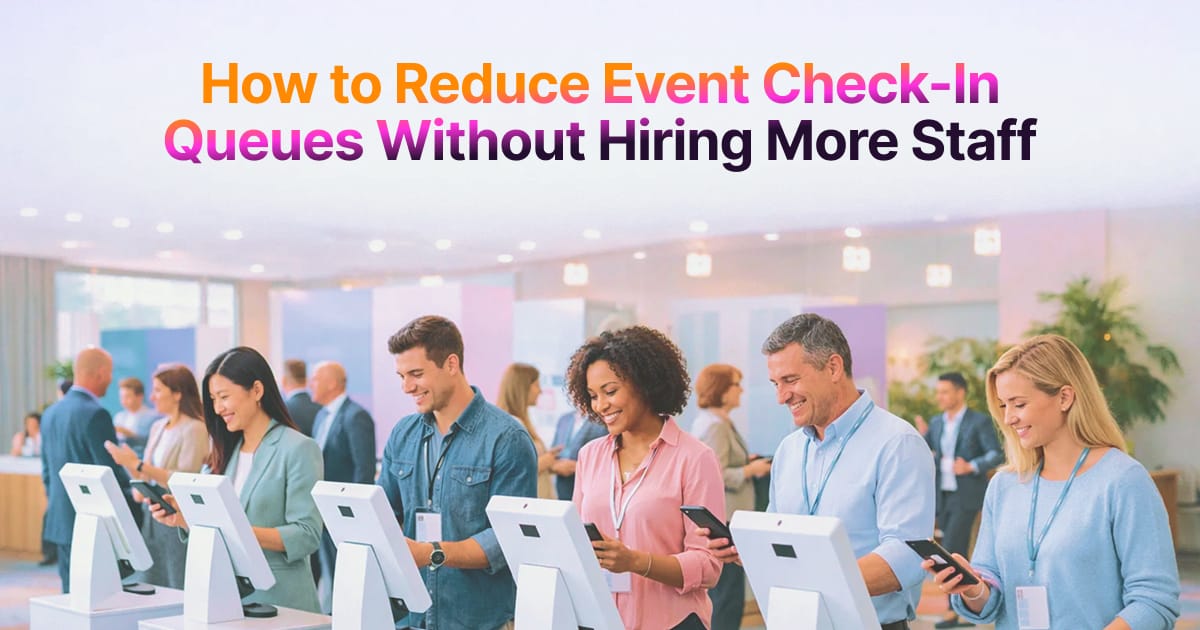
Kiosks are the ATM of events. Most attendees are comfortable using them, and they remove the “waiting for a staff member” variable entirely. Attendees scan their own phones, confirm their information on screen, and watch their badge print.
One staff member can oversee four kiosks, acting as a roaming helper rather than a data entry clerk. That means a bank of four kiosks with one support person can process the same volume as eight to ten manual staff.
Kiosks also operate hands-free. Show the QR code to the scanner, the system validates the registration, and the badge prints automatically. There’s no bottleneck caused by a staff member needing to explain something to one attendee while ten others wait.
On-Site Badge Printing Automation
Stop pre-printing 2,000 badges and spending hours sorting them alphabetically. Use print-on-demand technology instead. When an attendee scans their QR code, the badge prints instantly with their exact information.
This eliminates the “I can’t find your badge” awkwardness and saves 5-8 seconds per guest. It also reduces waste. If 200 people register but don’t show up, you haven’t printed 200 useless badges. You only print what you need, when you need it.
On-demand printing also handles last-minute registrations seamlessly. Someone buys a ticket the morning of your event? No problem. Their badge prints just like everyone else’s.
How to Run Your Check-In with Fewer Staff (ROI View)
When you shift from manual to automated check-in, you fundamentally change your staffing requirements and costs.
Here’s what the numbers actually look like:
| Method | Staff Needed | Time/Attendee | Queue Risk |
| Manual | 3-4 | 30s | High |
| QR Scan | 1-2 | 5s | Low |
| Kiosk | 0-1* | 8s | Very Low |
*The 0-1 staff for kiosks is a floater who handles technical questions, not someone doing actual check-in.
Manual desks scale linearly with staff. If you need to double your capacity, you need to double your people. Tech-enabled check-in scales exponentially with devices. Add one more kiosk, and you’ve potentially doubled your throughput with zero additional labor cost.
The Real Cost Comparison
Think about what happens when you hire 3-4 additional staff for a manual check-in desk:
- Training time: 2-3 hours per person
- Hourly wages: $15-25 per hour per person
- Increased human error: Wrong badges, missed registrations
- Coordination overhead: Managing a larger team takes more supervision
Now compare that to adding two kiosks. With 2 kiosks and 1 support staff member, you process attendees at 3 seconds per guest instead of 18 seconds with manual desks. That’s a 6x speed increase with a fraction of the labor cost.
Your staff also shifts from repetitive data entry to guest experience roles. Instead of saying “spell your last name please” 500 times, they’re greeting VIPs, answering questions about session locations, and solving real problems.
Technology throughput determines whether you have queues, not headcount. A single well-placed kiosk with instant badge printing can outperform three manual desks staffed by experienced people.
How Gevme Enables Fast, Self-Service Event Check-In
This is where a platform like Gevme becomes your behind-the-scenes partner. Gevme is an omnichannel event registration tool and an end-to-end flow manager that handles everything from ticketing to real-time entry analytics.
Kiosk Mode That Turns Any Tablet Into Your Check-In Station
With Gevme’s Kiosk Mode, you can turn iPads or Surface tablets into professional check-in stations. No specialized hardware required. Load the app, connect a badge printer, and you’re live. This makes scaling easy. Need more capacity at the last minute? Add another tablet.
QR Validation in Under Two Seconds
Gevme processes QR codes in under 2 seconds, even when you’re offline. The system validates the registration, confirms the ticket type, and triggers badge printing instantly. No lag. No manual verification. No risk of duplicate entries.
Instant Badge Printing with Zero Pre-Work
Gevme supports print-on-demand badge printing. When an attendee scans their code, their badge prints with their exact name, company, ticket type, and any custom fields you’ve configured. You’re not sorting boxes of pre-printed badges or dealing with misspellings. Everything is dynamically generated.
Offline Capability That Saves You When WiFi Fails
Venue WiFi goes down? Gevme’s offline mode keeps your check-in running. The system stores validation data locally and syncs everything once connectivity returns. You won’t even notice the outage. Your attendees definitely won’t.
Real-Time Entry Analytics to Prevent Bottlenecks
Gevme’s live dashboards show you exactly how many people are checking in per minute at each entry point. If one gate starts slowing down, you see it immediately and can redirect traffic or activate more kiosks. This prevents queues before they build instead of reacting after they’ve already formed.
Integration with Gevme Coplanner
Because Gevme connects registration, check-in, and live analytics in one ecosystem, your entry data feeds directly into your event operations dashboard, without manual exports or syncing issues.
Hence, when you’re using Gevme Coplanner to plan your event, your check-in strategy integrates directly. Your registration data, attendee lists, and entry workflows are all connected. No manual exports. No data mismatches. It’s built for staff-light operations, meaning you can manage large crowds with small teams.
Gevme feels like you added more staff without adding anyone. It’s the silent partner that makes your system work.
FAQs
QR code validation combined with instant badge printing. This combination processes attendees in 2-3 seconds and eliminates human error from name searches or badge hunting. Self-service kiosks allow multiple attendees to check in simultaneously without waiting for staff. The speed difference is dramatic: manual check-in averages 30 seconds per person, while QR and kiosk systems drop that to under 5 seconds.
Almost. Fully automated kiosks handle the entire check-in process without staff intervention. However, you should have one roaming staff member for every 5-10 kiosks to handle edge cases like lost tickets, technical questions, or attendees who need accessibility support. This “floater” model reduces your staffing needs by 60-70% compared to manual desks while maintaining quality service.
QR codes eliminate manual name lookup, which typically takes 20-40 seconds per person. With QR scanning, validation happens in 2 seconds. This 10x speed increase means a single kiosk can process more attendees than multiple manual desks. QR codes also reduce errors because the system reads encrypted data directly instead of relying on staff to type names correctly or find the right registration record.
You need a tablet (iPad or Surface), a stable stand or mount, a compatible badge printer like Zebra or Brother, and an internet connection (hardwired ethernet is preferred over WiFi). If your platform supports offline mode, you can sync data once connectivity returns. You’ll also need badge stock (cards or paper), power sources with surge protection, and clear signage to direct attendees to the kiosks.
Yes. QR codes are encrypted and tied to individual registration records. Each code is unique and can’t be duplicated. Modern event platforms like Gevme validate codes against the registration database in real time, preventing unauthorized entry. If someone tries to use a QR code twice, the system flags it immediately. Contactless check-in is actually more secure than manual processes because it eliminates the risk of staff accidentally admitting someone without proper verification.
Conclusion
Queues are a system problem, not a people problem.
When you redesign your check-in around speed, self-service, and data, even peak rush becomes manageable.
Ready to eliminate check-in queues at your next event? See how Gevme self-service check-in platform helps you process more attendees with fewer staff, without compromising experience.