Your event website is usually the first and only thing a potential attendee sees before deciding whether to register. Most organizers spend far more time on the event itself than on the page asking people to show up. That’s a reasonable order of priorities, right up until the website becomes the reason someone doesn’t register at all. A slow load will do that. So will a buried registration button, or a page that falls apart on the phone most people actually browse with.
The good news is that what makes an event website convert is well understood. Real usability research backs it up. Most of it doesn’t require a designer or developer to fix. This guide covers what the research says about page speed, mobile design and trust signals. It also shows how to build a site without a dev team, using tools built for exactly that. Finally, it compares seven platforms on website builder features specifically.
Key Takeaways
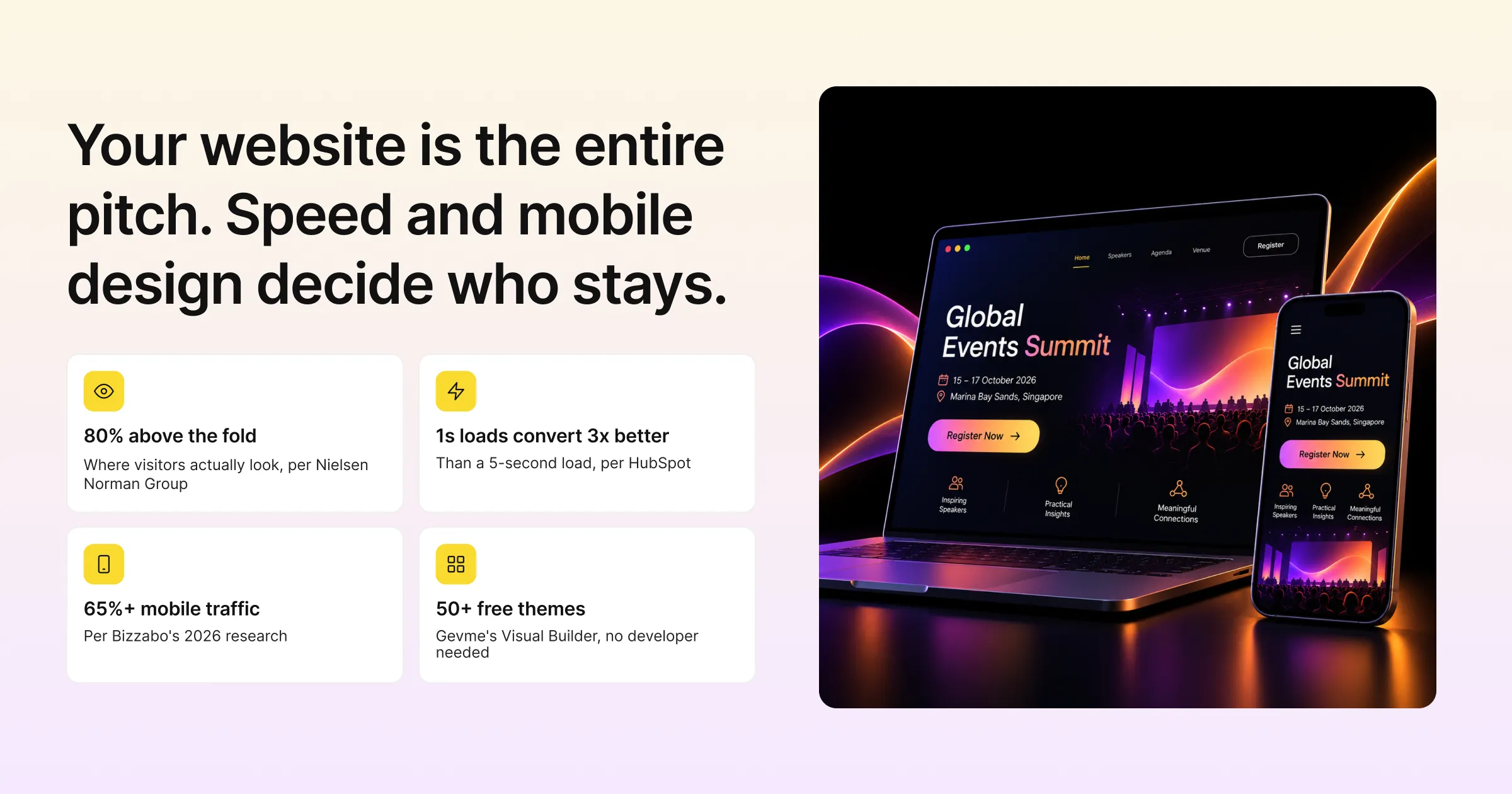
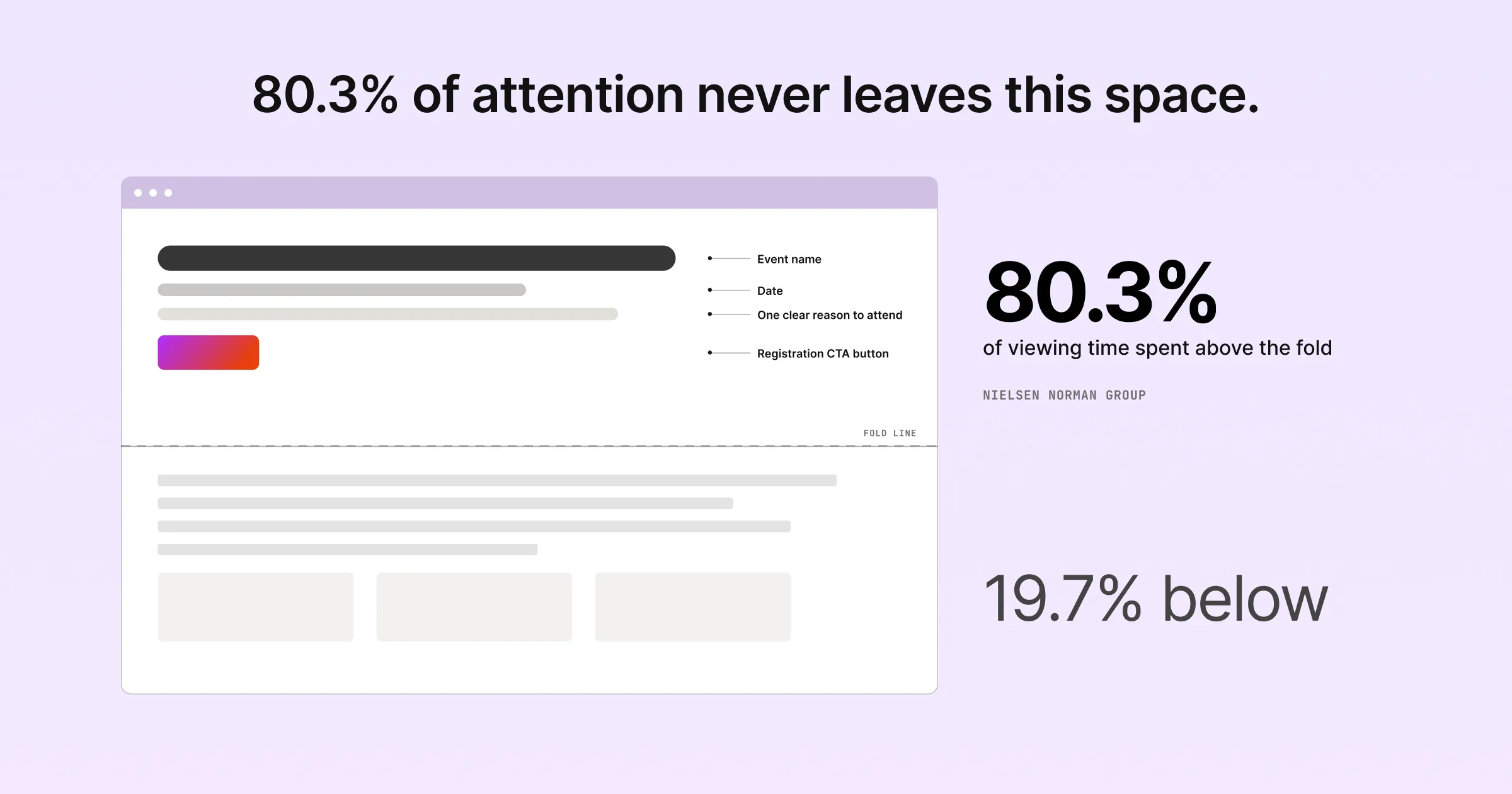
- Site visitors spend roughly 80 percent of their time above the fold. So your registration call-to-action and core event details need to be visible without scrolling, not buried further down the page.
- Page load speed has an outsized effect on conversion. Research cited by HubSpot found a page loading in one second converts three times better than one loading in five. It converts five times better than one loading in ten.
- Mobile traffic now makes up the majority of event website visits. Bizzabo’s own 2026 research puts it above 65 percent. So mobile design isn’t a secondary check, it’s the primary one.
- Gevme’s website builder includes more than 50 themes on its free plan. A custom domain is supported from the Starter plan up. That lets organizers launch a branded site without a developer.
- Whova markets one of the fastest build times in this category, stating a website can be created in around 10 minutes using its template-based builder.
- A single, clear call-to-action beats a page with multiple competing links. Both HubSpot and Cvent recommend removing navigation distractions from a registration page entirely.
- Authentic trust signals matter more than generic stock imagery. Think real photos from past events and genuine attendee quotes. Unbounce’s own research specifically recommends real names and photos over anonymous or generic testimonials.
Why Your Event Website Is Doing More Work Than You Think
Most people deciding whether to attend your event have never spoken to you, and never will before they register. The website is the entire pitch. It says what the event is, why it matters, what it costs, and how to sign up. A slow pitch loses that person. So does one that buries key information or looks broken on a phone, long before they see how good the event is.
This matters more now than it used to, because of where traffic comes from. Per Bizzabo’s own research on event website design trends, checked in late August 2026, more than 65 percent of event website traffic is now mobile. That is up from a smaller share in past years. So a site designed primarily for desktop, and merely “responsive” on mobile, is designing for the minority of visitors rather than the majority.
What the Research Actually Says About Conversion
Start with where people genuinely look. Per Nielsen Norman Group’s original eyetracking research, checked in late August 2026, users spend about 80.3 percent of their viewing time above the fold. Only 19.7 percent goes below it. People do scroll, but the content most likely to get seen is whatever’s visible before they do. So your event name, date, one clear reason to attend, and the registration button belong in that space, not several screens down.
Speed matters more than most organizers assume. Per research cited by HubSpot, checked in late August 2026, a one-second page converts three times better than a five-second one. It converts five times better than a ten-second one. Unbounce’s own research adds that roughly 83 percent of landing page visits now happen on mobile. Load times there tend to be slower by default. That makes a fast, lightweight mobile page a direct lever on registrations rather than a technical nicety.
A single, focused call-to-action outperforms a page trying to do several things at once. Both HubSpot and Cvent, in guidance checked in late August 2026, recommend stripping general site navigation off a registration page. Then the only real choice is to register, not to wander off to a blog post or homepage link. Cvent’s own guidance adds that a bold, specific call-to-action performs better than vague button copy. Think “Reserve Your Spot” rather than a generic “Submit.”
Trust Signals and Accessibility
Trust signals close the gap for someone who’s interested but not yet convinced. Per Unbounce’s research, checked in late August 2026, real testimonials with actual names and photos outperform generic or anonymous ones. Bizzabo’s design research adds that authentic photos and video from past events beat polished stock imagery on credibility. Keeping essential logistics visible in the page header also removes a small but real source of friction. Date, time, location or platform should not require a scroll or a click.
Accessibility is worth folding into this same conversation rather than treating it as a separate checklist. A page that’s hard to navigate with a screen reader or keyboard quietly excludes real attendees. So does one that relies on color alone to convey important information. Cvent builds its website tool to the WCAG 2.2 AA accessibility standard, a useful bar for any platform. A wider audience able to use your site comfortably is, in the end, the same goal as everything else in this section.
Building It: Website Builder Features Compared
You don’t need a developer to apply any of this. Most event platforms now include a drag-and-drop or template-based website builder, specifically so organizers can act on this kind of guidance themselves.
Gevme’s approach is template-driven. Per Gevme’s website builder page, checked in late August 2026, it offers a no-code Visual Builder. A themes marketplace supplies more than 50 themes and experiences on the free plan. Its pricing page, checked in late August 2026, confirms custom domain support and custom SEO features from the Starter plan up. Google Analytics and Google Tag Manager integration come with those. Higher tiers add custom CSS and full custom themes, for organizers who want more than templates.
Whova markets speed as its main selling point. Per Whova’s own blog, checked in late August 2026, it states a website can be created in around 10 minutes using its template-based builder. All templates are confirmed as fully responsive across devices. Updates to speakers, agenda or registration data sync to the site automatically, which Whova describes as effectively instant.
Cvent and Bizzabo
Cvent and Bizzabo both offer drag-and-drop builders with stronger customization ceilings. Per Cvent’s event website page, checked in late August 2026, it includes custom domain support and built-in SEO tools. Multi-language builds and WCAG 2.2 AA accessibility compliance are also covered. Per Bizzabo’s event marketing page, checked in late August 2026, its website builder supports a custom domain. It also allows advanced CSS, HTML and JavaScript editing for teams wanting more than the default templates.
Swapcard, EventMobi and Glue Up
Swapcard and EventMobi both build their site tools around the registration experience specifically, rather than a separate marketing site. Per Swapcard’s event homepage builder page, checked in late August 2026, it offers a drag-and-drop visual editor. A mobile preview toggle and support for more than 35 languages come with it. Per EventMobi’s help center, checked in late August 2026, its Website Builder is framed specifically as a registration website tool. It includes custom domain setup through your own DNS provider. A dedicated mobile design mode previews how pages look on a phone before publishing.
Glue Up is worth a specific note, because it offers two different things under a similar name. Per its own event page builder blog post, checked in late August 2026, its built-in page builder uses templates and is hosted on Glue Up’s own domain rather than a custom one. Separately, per its Website product page, checked in late August 2026, Glue Up offers a fully built, done-for-you website service with SEO optimization and mobile responsiveness. It states organizers can “go live in a week,” which is a distinct, more custom-built offering rather than the same self-service template tool.
Your Website Is Only Half the Job, the Handoff to Registration Matters Too
Say a fast, well-designed website dumps a visitor into a slow, confusing registration form. Most of the benefit of good design disappears right there. So a website builder tied directly to your registration platform has a real advantage over a standalone builder that hands off elsewhere. When both share the same data and design system, a visitor moves from browsing to checkout smoothly. There’s no jarring style change, and no second load of different software.
The same logic applies to what happens after someone registers. Say your event includes on-site check-in or a virtual and hybrid component. Build the website, registration and check-in on the same attendee record. Then whoever registered on your site shows up correctly at check-in, with no manual data transfer in the middle. It’s a detail that doesn’t show up in a website design checklist. Even so, it’s exactly the kind of friction a good landing page can accidentally create if the tools behind it don’t talk to each other.
A Few Terms Worth Knowing
- Above the fold: The part of a webpage visible without scrolling, generally where visitors spend the most attention.
- Call-to-action (CTA): The specific button or link asking a visitor to take an action, like “Register Now.” It’s ideally singular and clearly visible on an event landing page.
- Responsive design: A website that automatically adjusts its layout to look and function well on any screen size, from a desktop monitor to a phone.
- SEO (search engine optimization): The practice of structuring a page’s content, titles and technical details so it’s more likely to appear in search results for relevant terms.
How Gevme and Its Alternatives Compare on Website Builders
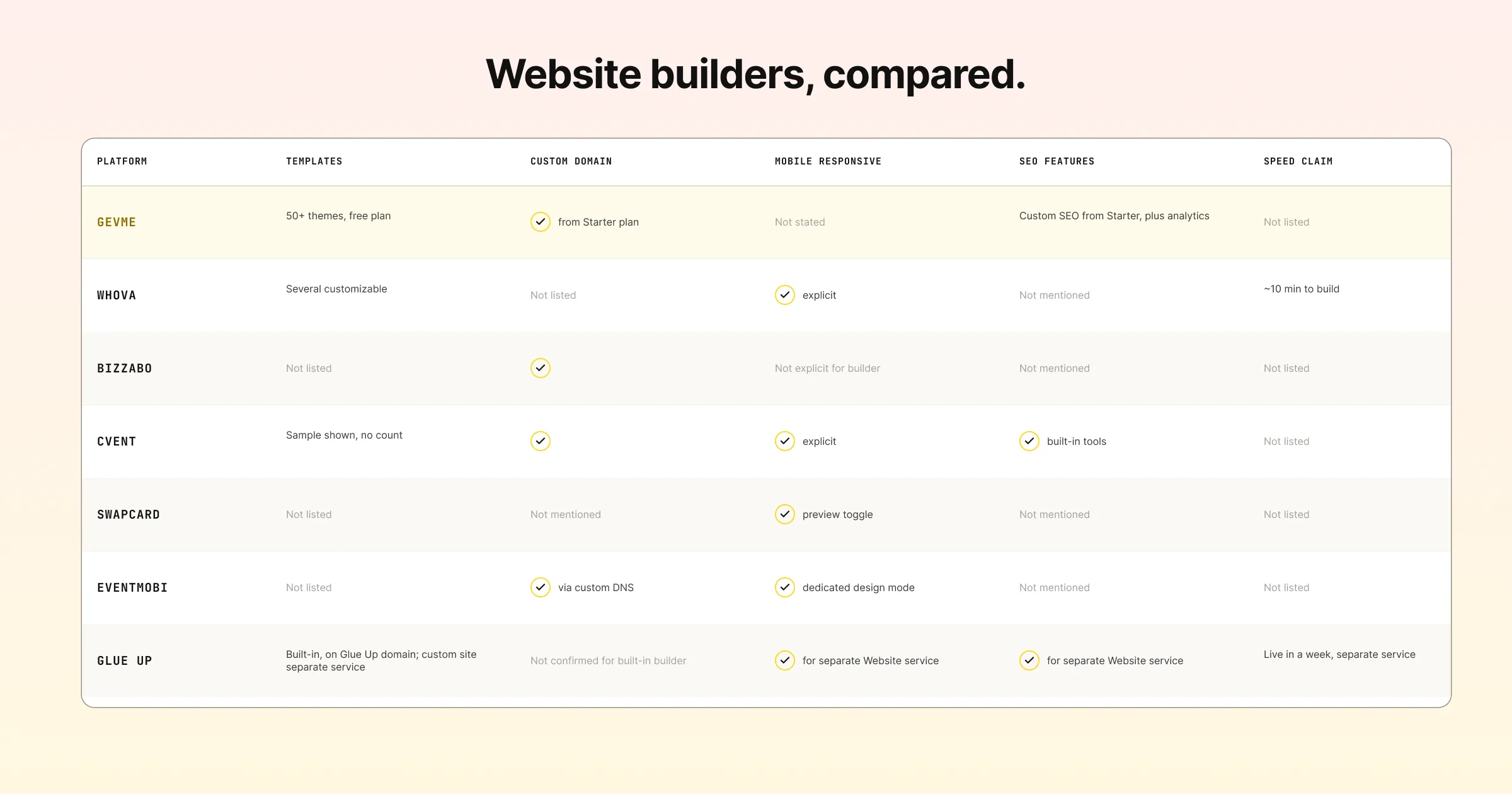
| Platform | Templates | Custom Domain | Mobile Responsive | SEO Features | Speed Claim |
|---|---|---|---|---|---|
| Gevme | 50+ themes on the free plan | Yes, from Starter plan | Not stated on their site | Custom SEO from Starter plan, plus analytics integrations | Not listed on their site |
| Whova | Several customizable templates | Not listed on their site | Yes, explicitly stated | Not mentioned | Around 10 minutes to build |
| Bizzabo | Not listed on their site | Yes | Not explicitly stated for the builder itself | Not mentioned | Not listed on their site |
| Cvent | Sample templates shown, no count published | Yes | Yes, explicitly stated | Yes, built-in SEO tools | Not listed on their site |
| Swapcard | Not listed on their site | Not mentioned | Yes, with a mobile preview toggle | Not mentioned | Not listed on their site |
| EventMobi | Not listed on their site | Yes, via custom DNS setup | Yes, with a dedicated mobile design mode | Not mentioned | Not listed on their site |
| Glue Up | Template-based, hosted on Glue Up’s domain (separate paid service available for a custom-built site) | Not confirmed for the built-in builder | Yes, for the separate Website service | Yes, for the separate Website service | “Go live in a week,” for the separate Website service |
Sources, checked in late August 2026, are each platform’s own product or pricing pages: Gevme, Whova, Bizzabo, Cvent, Swapcard, EventMobi, Glue Up. Vendor product pages change often. Confirm directly before you build against any feature listed here.
Which Platform Fits Which Kind of Event Website
Perhaps you want to launch a branded event site quickly without a developer, and you’d rather browse a large theme library than start from a blank page. Gevme’s website builder gives you more than 50 themes on its free plan alone. Custom domain and SEO features arrive as you move up to a paid tier. Where raw speed is your top priority and your site doesn’t need heavy customization, Whova’s roughly 10-minute build time is hard to beat.
Deeper customization points elsewhere. For custom code, multi-language builds, or accessibility compliance, Cvent and Bizzabo both support that level of control. You need the time or design resources to use it. Finally, some events are registration-first rather than marketing-first, meaning the “website” and the registration page are effectively the same thing. EventMobi and Swapcard both build their site tools specifically around that use case rather than treating it as a separate content site.
Pro Tip
Open your current event website on your phone, on mobile data rather than wifi. Time the load, and count the taps to reach the registration button. If either number surprises you, that’s the same experience a real attendee is having right now. It beats how the page looks on your own laptop with a fast office connection. Google’s PageSpeed Insights gives a more precise load-time number if you want to track improvement over several drafts.
Frequently Asked Questions
Yes, based on independent research. A one-second load time converts significantly better than a five- or ten-second one, according to data cited by HubSpot. With the majority of event website traffic now coming from mobile connections, slow load times affect most of your visitors, not a small minority.
For a registration-focused landing page, no. Guidance from both HubSpot and Cvent recommends removing general navigation from a page whose only job is getting someone to register. That way visitors are not pulled toward unrelated content instead of completing the one action that matters.
No. Gevme Visual Builder is a no-code, drag-and-drop tool with more than 50 themes available on the free plan. It is built for organizers to use directly without a developer, though custom CSS is available on higher tiers for teams who want to go further.
Whova states its template-based builder can produce a site in around 10 minutes. That is the most specific speed claim published among the platforms compared here. Other platforms describe ease of use in general terms without a specific time claim.
At minimum, the event name, date, a one-line reason to attend, and the registration button. Research shows visitors spend the large majority of their time above the fold, so anything critical to the decision to register should be visible without scrolling.
Yes, when they are authentic. Research from Unbounce found real names and photos outperform generic or stock testimonials. Bizzabo own design research recommends genuine photos and video from past events over polished stock imagery for the same reason.
Gevme, Cvent, Bizzabo and EventMobi all support custom domains, according to their own sites. Whova and Swapcard do not publish specific custom domain information. Glue Up built-in page builder is hosted on its own domain, with a custom-built site available as a separate service.
It is closely related. A site that is difficult to navigate with a screen reader, or that relies only on color to convey information, excludes real potential attendees before they reach your registration form. Cvent builds its website tool to the WCAG 2.2 AA standard, and treating accessibility as part of your conversion checklist tends to produce a better experience for everyone.
Conclusion: A Website That Does Its Job, Not Just Looks Good
Whova, Bizzabo, Cvent, Swapcard, EventMobi and Glue Up each build genuinely useful tools for getting an event website live without a developer. Whova wins on raw speed. Cvent and Bizzabo offer the most customization headroom for teams that want it. Swapcard and EventMobi both build the experience around registration directly. That fits events where the website and the sign-up page are one and the same.
Maybe you want a large theme library and a no-code builder, plus the option to add a custom domain and real SEO features as you grow. No separate service or developer on standby. Gevme’s website builder is worth a look, especially since the free plan alone includes more than 50 themes to start from. Does your next event’s website need to load fast, look good on a phone, and get people to click register? Request a demo and see how quickly you can get one live.