Events AI Playbook — Advanced Agent Development | Aug 19
What’s New in
Gevme
Summer 2026
Registration
Omnichannel
Gevme Summer Release 2026

This summer, Gevme introduced new capabilities across Registration and Omnichannel to help event teams work more efficiently, scale operations with greater confidence, and deliver more connected attendee experiences.
From simplifying event portfolio management and strengthening registration security to improving onsite coordination, engagement visibility, and access control, these enhancements were designed to reduce everyday operational effort and give organisers greater control across the entire event journey.
The Summer Release also introduced IcebergHub, an AI-powered advocacy platform developed with The Iceberg Charity Trust. It gives associations, destinations, event professionals, and policymakers a faster way to discover and use credible evidence about the wider value of business events.
With source-backed industry intelligence available through one searchable platform, teams can build stronger advocacy cases, support bids and policy conversations, and communicate the economic, social, and knowledge impact of events more effectively.
Together, the Summer Release helps teams simplify event operations, turn industry intelligence into action, and focus on creating successful, secure, and impactful events.
Gevme Registration
Scale Event Operations with a Smarter Event Management Workspace

Manage more events with less operational effort
As event portfolios grow, teams need more than a list of events. They need a workspace that helps them quickly understand what is happening, identify what requires attention, and move between events without slowing down.
The redesigned Event Listing Interface gives organisers a clearer, faster, and more scalable way to manage events across teams and organisations. Important information is surfaced upfront, frequently used actions are easier to access, and stronger search and filtering tools make even large event portfolios easier to navigate.
Whether a team is managing a handful of events or coordinating an enterprise-wide programme, the redesigned interface helps reduce administrative friction and keeps event operations moving efficiently.
How it helps your team
- See what matters at a glance — Review event status, dates, attendee counts, and other important information without opening each event individually.
- Find any event faster — Use enhanced search, filtering, and sorting to quickly locate events across large or complex portfolios.
- Keep priority events close — Mark frequently accessed events as favourites for faster day-to-day access.
- Move directly into action — Open commonly used areas such as Attendees and Orders directly from the event listing.
- Turn event data into operational insight — Export listing data to support reporting, analysis, planning, and internal tracking.
- Manage across organisations more efficiently — Oversee events from multiple organisations through a more unified experience.
The value for organisers
- Scale event operations without adding unnecessary administrative overhead.
- Spend less time searching for information and more time acting on it.
- Improve visibility across active events, teams, and organisations.
- Make high-volume event management more structured and manageable.
- Give enterprise event teams a stronger foundation for portfolio-level oversight and reporting.
Turn Every Social Share into an Opportunity to Grow Event Reach

Create more compelling event previews that attract attention and drive traffic
An event link is often the first interaction a prospective attendee has with an event. When that link is shared on LinkedIn, Facebook, X, WhatsApp, or another platform, its title, description, and image can influence whether someone stops, clicks, and learns more.
Configurable social sharing settings give organisers greater control over that first impression. Marketing and event teams can tailor how event pages appear when shared, helping every link look more engaging, professional, and consistent with the event brand.
This makes social sharing more than a distribution action. It becomes another opportunity to increase visibility, strengthen campaign consistency, and encourage prospective attendees to visit the event page.
How it helps your team
Organisers can configure the following social sharing details:
- Open Graph Title — Create a clear, attention-grabbing title for shared event links.
- Open Graph Description — Highlight the event’s value and give audiences a stronger reason to click.
- Open Graph Image — Use campaign visuals that reinforce the event brand and message.
- Open Graph Image URL — Specify the image displayed across supported social and messaging platforms.
When custom settings are not provided, Gevme uses the event’s default information for link previews.
The value for organisers
- Increase the visibility and appeal of event content across social channels.
- Create stronger first impressions for prospective attendees.
- Improve click-through potential with more relevant titles, descriptions, and imagery.
- Maintain consistent branding across campaigns, social posts, and shared messages.
- Give marketing teams direct control over how event links are presented.
- Turn attendee, partner, and stakeholder sharing into a more effective source of event traffic.
Keep Teams Focused on Current Events Automatically

Maintain a cleaner workspace as your event portfolio grows
When completed events remain mixed with active ones, organisers spend more time navigating outdated information and less time focusing on what needs attention today.
Automatic archiving keeps the active event workspace relevant by moving past events into the Archived Events section. Current events remain easier to locate and manage, while historical information stays available for reporting, reference, and audit needs.
This allows teams to maintain a more organised event portfolio without introducing another manual housekeeping task.
How it helps your team
- Keep active workspaces relevant — Move past events out of the main event view once they are no longer active.
- Reduce visual and operational clutter — Help teams focus on current and upcoming events.
- Retain valuable event history — Keep archived events accessible for reporting, analysis, and future reference.
The value for organisers
- Spend less time manually cleaning up event listings.
- Make current priorities easier for teams to identify.
- Improve long-term organisation across growing event portfolios.
- Preserve historical event data without cluttering everyday workflows.
- Create a more focused and efficient workspace for event operations.
Convert More Registrations with a Faster, More Trusted Checkout Experience

Give attendees greater confidence at the point of payment
Checkout is one of the most critical moments in the registration journey. A slow, confusing, or untrusted payment experience can create hesitation and increase the risk of incomplete purchases.
The upgraded hosted checkout experience provides attendees with a smoother, more modern, and more secure payment journey. It also gives organisers a stronger technical foundation for supporting evolving payment and security requirements.
The result is a more professional registration experience that helps attendees complete transactions with greater ease and confidence.
How it helps your team
- Create a smoother path to purchase — Provide attendees with a cleaner and more intuitive checkout flow.
- Strengthen transaction security — Support stronger authentication and fraud-protection measures during payment.
- Protect payment information — Improve the secure handling of payment data through the hosted checkout experience.
- Prepare for future payment needs — Use modernised checkout infrastructure designed to support upcoming enhancements.
The value for organisers
- Reduce friction during registration and ticket purchasing.
- Give attendees greater confidence when completing payments.
- Deliver a more polished and consistent end-to-end registration journey.
- Strengthen payment security and reduce transaction risk.
- Build on a more future-ready foundation as payment expectations evolve.
Gevme Omnichannel
Turn Onsite Meetings into Measurable Engagement

Move beyond scheduled meetings and understand what actually happened
For networking and business matching events, the number of meetings scheduled tells only part of the story. Organisers also need to know which meetings took place so they can assess participation, demonstrate engagement, and improve future programmes.
Physical Meeting Tracking allows participants to confirm whether a scheduled onsite meeting occurred. This gives event teams more reliable insight into networking outcomes and creates stronger data for post-event reporting, stakeholder updates, and follow-up.
How it helps your team
- Capture real meeting outcomes — Allow participants to confirm whether an onsite meeting took place after its scheduled time.
- Understand networking performance — Review confirmation data to see how scheduled meetings translated into actual engagement.
- Strengthen reporting — Use meeting outcome data in post-event analysis and stakeholder reporting.
The value for organisers
- Measure onsite networking activity with greater confidence.
- Demonstrate the impact of business matching and hosted buyer programmes.
- Identify gaps between scheduled and completed meetings.
- Support more informed post-event follow-up.
- Use real engagement data to improve future networking experiences.
Complex Attendee Schedules Managed from One Central Workspace

Reduce scheduling effort and keep onsite programmes running smoothly
Networking and business matching events often involve hundreds of individual meetings, multiple attendee groups, scheduled breaks, and constant onsite coordination. Managing this information across disconnected files and workflows creates unnecessary effort and increases the risk of scheduling errors.
The enhanced attendee schedule management experience gives organisers a central place to review schedules, find attendee information, export operational data, download individual itineraries, and account for planned breaks.
This helps teams coordinate more accurately before the event and respond more effectively when supporting attendees onsite.
How it helps your team
- See attendee schedules in one place — Review individual meeting programmes through a centralised schedule management experience.
- Find information quickly — Search and filter attendees and schedule details without manually reviewing multiple records.
- Prepare teams with the right data — Export schedule information for reporting, operations, and onsite coordination.
- Give attendees clear itineraries — Download individual schedules for distribution or support.
- Build realistic meeting programmes — Configure lunch, coffee, and other breaks directly within networking schedules.
The value for organisers
- Reduce the manual work involved in reviewing and distributing schedules.
- Prevent meetings from being planned across important breaks.
- Improve coordination between event teams, attendees, and onsite support staff.
- Respond faster to schedule-related questions and changes.
- Run complex networking programmes with greater accuracy and control.
- Create a smoother experience for attendees throughout the event.
Adapt Every Journey to Real Onsite Activity

Use check-in status to make attendee journeys more relevant and controlled
At live events, access requirements can change depending on whether an attendee has arrived, entered a specific area, or completed a required check-in step.
Check-in-Based Access Control allows organisers to use attendee check-in information when determining access to selected pages, content, and experiences. This makes it easier to create journeys that respond to real onsite activity rather than relying only on pre-event registration data.
Teams can provide more relevant experiences while maintaining greater control over who can access specific content or event areas.
How it helps your team
- Respond to real attendee behaviour — Use check-in information as part of access-control decisions.
- Control access more precisely — Make selected pages, content, or experiences available only to relevant attendee groups.
- Create more contextual journeys — Tailor experiences according to an attendee’s onsite participation and status.
The value for organisers
- Deliver content and experiences at the most relevant point in the attendee journey.
- Strengthen control over restricted pages and onsite experiences.
- Create more personalised interactions based on actual attendance.
- Reduce reliance on manual access checks.
- Give event teams greater flexibility during fast-moving live events.
- Support more secure and intentional attendee journeys.
Create a More Polished First Impression at Self Check-In

Bring greater brand consistency to one of the attendee’s first onsite touchpoints
The self check-in screen is often the first branded experience attendees encounter when they arrive. Small inconsistencies in sizing, readability, or presentation can affect how professional and intuitive that experience feels.
Enhanced Search button customisation gives organisers more control over the Self Check-In Welcome Screen. Teams can adjust the button typography, preview changes before publishing, and create a more consistent experience across different screens and kiosk configurations.
This helps ensure that the check-in journey feels considered, on-brand, and easy to use from the moment attendees arrive.
How it helps your team
- Improve readability — Adjust the Search button font size to suit different layouts and kiosk environments.
- Preview before going live — Review visual changes in advance and reduce onsite surprises.
- Maintain consistency across displays — Improve text rendering across different screen sizes and kiosk setups.
The value for organisers
- Create a stronger and more professional first impression.
- Maintain visual consistency across onsite touchpoints.
- Give event teams more control over the self check-in experience.
- Improve usability for attendees arriving at the venue.
- Reduce the need for last-minute interface adjustments onsite.
- Reinforce event branding from the beginning of the attendee journey.
IcebergHub Launch

Make the Impact of Business Events Easier to Discover, Prove, and Communicate
Turn decades of industry evidence into usable advocacy intelligence
Business events create economic value, advance knowledge, strengthen communities, and deliver meaningful social outcomes. Yet the evidence of this impact is often scattered across reports, case studies, congress outcomes, videos, and industry publications.
Launched in partnership with The Iceberg Charity Trust, IcebergHub is an AI-powered advocacy and knowledge platform that makes this evidence easier to find, understand, and use.
Bringing together more than 440 curated industry sources, IcebergHub helps associations, destinations, institutions, policymakers, academics, and event professionals access credible, source-backed intelligence about the value of business events.
Users can ask questions in natural language and receive relevant, cited answers within seconds—helping them move from describing the importance of events to proving their impact.
How it helps the industry
- Search hundreds of trusted reports, case studies, videos, and industry resources in one place.
- Ask complex questions using natural language.
- Receive answers supported by citations and original source links.
- Strengthen policy cases, funding proposals, destination bids, presentations, and strategic plans.
- Explore the economic, social, scientific, civic, community, and knowledge-based impact of events.
- Turn research into practical, evidence-based advocacy and communications.
- Access a knowledge base that continues to grow as new evidence is added.
The value for event professionals and organisations
- Reduce the time needed to research and validate event impact.
- Strengthen engagement with governments, policymakers, funders, and institutional stakeholders.
- Support bids and proposals with credible evidence.
- Demonstrate the long-term outcomes of meetings and congresses.
- Communicate value beyond attendance and revenue metrics.
- Make industry knowledge more accessible to academics, students, and future event leaders.
- Create a shared reference point for a clearer, more consistent industry message.
A Growing Gevme Ecosystem Built Around Event Impact
The launch of IcebergHub marks an important expansion of the Gevme ecosystem.
Beyond helping organisations manage registration, engagement, and onsite experiences, Gevme now supports the industry in discovering knowledge, demonstrating outcomes, and advocating for the wider value of events.
Developed with The Iceberg Charity Trust, IcebergHub combines Gevme’s AI and platform capabilities with The Iceberg’s extensive collection of curated industry intelligence.
Together, the partnership aims to help the industry run better events, prove their value, amplify their impact, and strengthen their contribution to economies, communities, knowledge, and society.
The value of business events has always been there. IcebergHub helps make it visible.
Built for Evidence-Based Industry Advocacy
IcebergHub is designed for professionals and organisations that need trusted evidence to influence decisions and communicate impact, including:
- Associations and professional societies
- Convention bureaux and destination organisations
- Event organisers, venues, and industry partners
- Academic and research institutions
- Government agencies and policymakers
- Advocacy, communications, and public affairs teams
- Students and future industry professionals
Through the Iceberg Ambassador programme, users can access the platform’s curated knowledge base, natural-language search, structured research tools, and cited outputs.
Whether preparing a destination bid, building a policy case, demonstrating a congress legacy, or explaining the broader value of business events, IcebergHub helps professionals move from finding evidence to using it effectively.
Where Event Intelligence Meets Industry Advocacy
IcebergHub advances how the global business events industry understands and communicates its contribution.
By connecting fragmented evidence and making it searchable through AI, the platform gives professionals a faster, more reliable way to turn industry knowledge into action.
More than a technology platform, IcebergHub is a shared intelligence resource that helps organisations, destinations, and professionals communicate the value of business events with greater confidence and consistency.
Many voices. One message. The value of business events matters and the evidence is now easier to find.
Ready to See it in Action?
These updates are already live and built to make your workflows smoother, faster, and smarter. Want a walkthrough or just curious how it fits into your setup?
Book a demo with us, we’d love to show you around.
Spring 2026
Registration
Driving Conversion, Engagement, and Onsite Control
This quarter’s updates focus on improving conversion across registration, enhancing engagement capabilities, strengthening onsite security, and expanding platform flexibility for developers and organizers.

Gevme Registration
Native Abandoned Cart Management
The Native Abandoned Cart feature replaces legacy manual backend configurations with a fully integrated, self-service module designed to help organizers recover incomplete registrations and boost event attendance.

Key Features
- Real-Time Data Capture: The registration form now natively monitors field changes and periodically auto-saves partially filled forms every 10 seconds and on field blur.
- Self-Service Configuration Panel: Organizers can now independently enable tracking and configure schedules directly within the Gevme platform.
- Personalized Resume Links: Each abandoned record generates a unique URL that pre-populates the registration form with saved attendee data, selected tickets, and promotion codes.
- Automated Email Reminders: Deliver scheduled re-engagement emails based on either “cart age” (e.g., 3 days after abandonment) or a “fixed schedule” (e.g., daily at a specific time).
- Integrated Data Grid: A new dashboard provides a comprehensive view of all tracked registrants, featuring filtering, search capabilities, and detailed metrics on click-through and open rates.
- Smart Status Tracking: The system automatically marks records as “Registered” once a tracked attendee completes their order, immediately suppressing any further reminder emails.
Benefits
- Re-Engage Potential Attendees: Organizers can easily identify and reach out to users who started but did not complete their registration, turning missed opportunities into confirmed tickets.
- Eliminate Manual Setup: By moving from custom JS and developer-led setups to a native DIY interface, organizers gain immediate, on-demand control over their tracking and recovery campaigns.
- Frictionless Resumption: Unique continuation links provide a seamless experience for attendees, allowing them to pick up exactly where they left off without re-entering their information.
- Optimized Marketing Workflows: Automated, template-based reminders ensure consistent follow-up without manual oversight, freeing up organizers to focus on other event priorities.
- Data-Driven Insights: The native data grid and aggregate metrics allow organizers to monitor the effectiveness of their recovery efforts and fine-tune their messaging schedules for better results.
Flexible Promo Code Management on Registration Forms
This enhancement to the Gevme Registration platform introduces more flexible discount management, allowing attendees to apply, update, or remove promo codes directly within the registration form.

Key Features
- Integrated Form Input: The promo code field can now be enabled directly on registration forms, moving beyond the limitation of applying codes only on the Event Landing Page.
- Real-Time Fee Recalculation: On adding, updating, or removing a code, the system instantly recalculates ticket fees, merchandise costs, taxes, and the total payable amount.
- Configurable Visibility: Organizers can easily enable or disable this field via a checkbox in Event Settings under the “Forms” page.
- Intelligent Validation: The system provides real-time validation against usage limits, valid date ranges, and ticket-specific criteria.
- Automatic Capacity Management: If a user removes an applied promo code before submission, the system automatically releases that usage capacity back into the pool.
Benefits
- Reduced Drop-off Rates: By allowing attendees to apply discounts directly during the registration process, you eliminate the need for them to navigate back to the landing page, creating a smoother path to completion.
- Enhanced Pricing Transparency: Instant recalculations ensure attendees see their exact final price immediately after applying a code, building trust and reducing confusion at the payment stage.
- Greater Operational Flexibility: The ability to enable promo codes on both the landing page and the form (or just one) gives organizers complete control over how and when discounts are presented to different audience segments.
- Consistent User Experience: The form-based input follows the same case-sensitivity and validation logic as the landing page, ensuring a predictable experience regardless of where the code is entered.
API Enhancements
Key Features
- Full Viral Pass Support: API endpoints now fully replicate the Viral Pass flow. Developers can programmatically issue referral promo codes, apply discounts, and grant partial refunds automatically upon transaction completion. Referral codes are now also returned in attendee and order data.
- New Attendee Ticket Transfer Endpoint: A new dedicated endpoint supports atomic ticket transfers. This allows an existing attendee to be replaced with a new one while preserving order integrity and maintaining a full system audit trail. The system automatically handles check-in/login validations and cancels the original ticket while generating a new one.
- New Update Cart Functionality: We have added a PUT endpoint that allows users to modify active carts. Developers can now update ticket assignments and add or remove promo codes, with the API responding with updated real-time calculations.
- Enhanced Order Details: The “Get Order Details” response for both User and Service APIs has been enhanced to include the buyer_id. This provides easier referencing and better data mapping between orders and buyers.
Benefits
- Streamlined Referral Marketing: By integrating Viral Pass into the API, organizers can automate their word-of-mouth marketing efforts, ensuring referrals and rewards are tracked and processed without manual intervention.
- Maintained Order Integrity: The Ticket Transfer API ensures that even when attendees change, payment, pricing, and order history remain unchanged and fully traceable.
- Greater Cart Flexibility: The ability to update carts post-creation reduces the need to cancel and recreate registrations when attendees change their mind about ticket types or promo codes.
- Improved Developer Experience: Adding critical fields like buyer_id and supporting atomic operations for transfers reduces the number of calls developers need to make, simplifying integration and data reconciliation.
Enhanced Onsite Security with Organisation-Level Session Management
The Gevme Onsite module now aligns with organisation-level session management configurations, ensuring that administrative security protocols are consistently enforced across all onsite interactions.

Key Features
- Configurable Maximum Session Duration: The onsite module now respects administrative limits for maximum session length, which can be set to 2, 4, 6, 8, or 12 hours. If no specific limit is set, the system maintains a secure default of 24 hours.
- Intelligent Inactivity Timeout: Organisation admins can now define inactivity timeouts of 1, 2, 4, or 6 hours.
- Activity Detection: The system intelligently identifies user activity, including non-API interactions such as using camera or scanner modes, to ensure active staff are not prematurely logged out.
- Secure Logout Warnings: When 15 minutes remain before an idle session expires, a mandatory modal appears. To maintain security, user activity at this stage no longer background-resets the timer; users must explicitly choose to “Continue Session” or “Logout”.
- End Session on Browser Close: A new functional option allows sessions to be terminated immediately upon closing the browser, preventing unauthorized access on shared onsite terminals.
- Smart Redirection Logic: Upon session expiration, the system now uses improved logic to redirect users to the appropriate login page based on their user type (e.g., backend users are directed to the main Registration login, while onsite-only users see the Onsite Login portal).
Benefits
- Strengthened Onsite Security: By strictly enforcing maximum session durations and inactivity timeouts, event organisers can mitigate the risk of unauthorized access on onsite devices.
- Administrative Control: Admins now have the granular capability to specify whether these global security settings apply to onsite users, allowing for flexibility based on specific event needs.
- Optimized Staff Workflow: Intelligent activity detection ensures that onsite staff remain logged in while actively performing essential tasks like scanning, preventing workflow interruptions.
- Reliable Session Management: Improvements to the inactivity modal and redirection logic ensure a clear, predictable experience for users when a session does eventually expire.
Gevme Omnichannel
"Login with Google" Support for Exhibitor Dashboard
“Login with Google” support is now available for the Exhibitor Dashboard, streamlining authentication by allowing exhibitors to access their accounts using Google credentials.

Key Features
- Integrated Google Login Option: A new “Login with Google” button is now available on the Exhibitor Dashboard login screen (https://exhibitor.gevme.com/login).
- Consistent UI/UX Design: The login interface and button placement have been designed to mirror the existing implementation on the Gevme Admin Dashboard, ensuring a familiar experience across the platform.
- Seamless OAuth Integration: The feature integrates directly with Gevme’s existing OAuth configuration to provide secure and reliable authentication.
- Automatic Redirection: Upon successful authentication, users are automatically redirected to their exhibitor home page to begin managing their event presence immediately.
- Robust Error Handling: The system includes built-in error handling to manage unauthorized or invalid login attempts securely.
Benefits
- Faster Access for Exhibitors: By enabling Google authentication, exhibitors can log in with a single click, eliminating the need to remember and manage separate platform-specific passwords.
- Unified Login Experience: Aligning the Exhibitor Dashboard with the Admin Dashboard creates a consistent professional standard across different Gevme modules.
- Enhanced Security: Leveraging Google’s secure OAuth framework provides exhibitors with a trusted and high-standard authentication method.
Secure Attendee Search for Self-Check-In Kiosks
A controlled and secure Attendee Search feature is now available for Self-Service Kiosks and Mobile mode, allowing attendees to be located via name or other identifiers when enabled by organizers.

Key Features
- Configurable Search Toggle: Organizers can now enable or disable attendee search for specific deployments through the backend settings. The feature is disabled by default to ensure maximum privacy.
- Customizable Search Criteria: Organizers have full control over which fields are searchable, such as First Name, Last Name, Email, Company, or Registration ID.
- Privacy-First Display Settings: Organizers can select exactly which fields appear in search results. For enhanced security, sensitive data like email addresses and phone numbers can be partially obscured (e.g., jo****@company.com).
- Dynamic Attendee Interface: When enabled, attendees will see a “Search” button on the self-check-in screen that opens a dynamic, case-insensitive search bar.
- Security Guardrails: To prevent bulk data exposure, search results are limited or paginated, and full data exposure of sensitive fields is restricted.
Benefits
- Improved Check-In Versatility: By moving beyond QR-only check-ins, organizers can provide a fallback for attendees who may have lost their confirmation details, reducing bottlenecks at registration.
- Granular Security Control: Organizers can balance convenience with privacy by choosing exactly which fields are searchable and which are masked in public-facing results.
- Event-Specific Customization: Configuration is saved per deployment, allowing organizers to enable search for manned kiosks while keeping it disabled for unmonitored stations.
- Seamless Attendee Experience: The core QR-based flow remains unchanged, ensuring that the new search capability acts as a non-disruptive enhancement to the existing check-in process.
Flexible Attendee Reporting in Onsite Custom Report
The Onsite Custom Reports module has been enhanced to provide greater flexibility in attendee data reporting, allowing organizers to control which attendees are included in tabular reports.

Key Features
- “Include All Attendees” Option: A new checkbox is now available when creating or editing Tabular Reports, labeled “Include all attendees (checked-in & not checked-in)”.
- Intuitive Placement: The option is conveniently located directly above the “Choose your columns” section for easy access during report configuration.
- Customizable Reporting Behavior:
- Unchecked (Default): The report continues to reflect only attendees who have checked in, maintaining consistency with existing workflows.
- Checked: The report expands to include the full attendee list, regardless of their check-in status.
- Full Export Support: Your selected preference is automatically applied to all exported reports, whether in CSV or Excel format.
Benefits
- Comprehensive Data Visibility: Organizers can now generate a complete view of their event’s registration status in a single report, rather than being limited to only those who have arrived onsite.
- Improved Reconciliation: By including both checked-in and not checked-in attendees, you can more easily identify no-shows and reconcile registration numbers against actual attendance.
- Seamless Integration: This feature has no impact on your existing saved reports unless you specifically choose to enable it, ensuring your established reporting processes remain uninterrupted.
Ready to See it in Action?
These updates are already live and built to make your workflows smoother, faster, and smarter. Want a walkthrough or just curious how it fits into your setup?
Book a demo with us, we’d love to show you around.
Winter 2025
Registration
Amplify, Automate, Accelerate

Gevme Registration
The New Viral Pass Referral Feature

We are excited to introduce Viral Pass, a powerful new feature that allows event organizers to easily implement a comprehensive referral program directly within their registration events. This Feature is designed to turn your attendees into brand advocates and drive exponential registration growth.
What is Viral Pass?
Viral Pass enables you to set up a robust, two-way incentive campaign that rewards both the attendee who refers new buyers (the referrer) and the attendee who is referred (the referred attendee).
Key Features:
- Two-Way Incentive Campaign: Set up dynamic campaigns that offer:
- Money Back / Refund to the referrer.
- Discount for the referred attendee.
- Flexible Payout Configuration: Set the referrer refund amount per order or per ticket price level, giving you granular control over your incentive structure.
- Automated Refund Processing: Viral Pass supports automatic payment transactions for processing referrer refunds, significantly reducing manual effort and ensuring instant satisfaction.
- Manual Payment Support: For flexibility, the feature also supports manual payment transactions where you can track and process refunds outside the platform.
- Seamless Social Sharing: Upon completing registration, attendees receive their unique referrer code and can instantly share it via a fully integrated sharing widget. This widget is available on the confirmation page and in emails sent from the system, maximizing the code’s visibility and use.
Benefits of Viral Pass:
- Drive Explosive Registration Growth: By incentivizing existing buyers to bring in new attendees, you leverage the power of word-of-mouth marketing, leading to a significant increase in registrations.
- Maximize Attendee Engagement: Turning attendees into active promoters strengthens their connection to your event, increasing engagement and excitement even before the event starts.
- Reduce Marketing Costs: Referral programs are often one of the most cost-effective marketing channels. You only pay a reward when a successful registration occurs, offering a high return on investment.
- Automate Payouts for Efficiency: The automatic refund feature saves your team countless hours of manual reconciliation and payment processing, ensuring fast and accurate refunds for referrers.
- Highly Customizable Incentives: The flexibility to set rewards per order or per ticket level allows you to tailor your campaign to meet specific event goals and budget requirements.
Viral Pass is your new essential tool for building community, rewarding loyalty, and ensuring your next event is your biggest yet. Start setting up your referral program today!
Enhanced Email Flexibility with EML File Support

We are pleased to introduce a powerful enhancement to the Gevme Registration platform, providing new capabilities for working with Email Message (.EML) files. This feature delivers greater control and flexibility over your email templates and attendee communications.
Key Enhancements:
- Import EML Files as Templates: You can now import existing
.emlfiles directly into the Gevme Email Template section.- Streamlined Template Management: This feature mirrors the existing HTML import process, allowing you to quickly leverage externally designed or archived email layouts.
- Safe Overwriting: A confirmation prompt will appear before uploading (e.g., “Uploading this EML file will overwrite the existing template content. Continue?”), ensuring you never accidentally lose your work.
- Export Attendee-Specific EML Files: You can now export personalized
.emlfiles for individual attendees using any selected email template.- Simple Export Flow: Select your attendees, choose a template, go to the Preview page, and click the new “Download as EML files” button.
- Personalized Content and Data Binding: Each exported
.emlfile is dynamically generated and includes:- The unique Ticket QR Code Image for that attendee.
- Actual, personalized CTA links (e.g., “View Ticket,” “Join Event”) that match the live email send functionality.
- Structured File Naming: Files are conveniently named using the format
<Attendee_ID>-<Event_ID>.emlfor easy organization and identification.
Benefits of this Feature:
- Unprecedented Email Design Flexibility: Easily import complex email designs created outside of Gevme, saving development time and ensuring brand consistency across platforms.
- Flawless Mass Personalisation: Exporting .EML files allow for individual personalisation including attendee-bound data like QR codes and dynamic links that a specific attendee will receive, ensuring flawless execution before a mass send.
- Seamless Integration with External Tools: EML files can be opened and tested in various email clients or imported into other systems, broadening your toolset for email management and quality assurance.
This update empowers you with professional-grade tools for managing your email communications, giving you confidence that every message is delivered perfectly.
Advanced Promo Code Criteria Operators

We are rolling out an upgrade to the operators for applying promo codes. This enhancement provides event organizers with significantly more flexibility and precision when defining which attendees or products qualify for a discount.
New Criteria Operators Added:
We have added the following advanced matching options to your promo code settings:
- Starts With: Apply the promo code when a specific field value begins with the defined string.
- Ends With: Apply the promo code when a specific field value ends with the defined string.
- Starts With (Comma Separated Values): Apply the promo code when a specific field value begins with any of the defined comma-separated text.
- Ends With (Comma Separated Values): Apply the promo code when a specific field value ends with any of the defined comma-separated text.
- Exclude Starts With (Comma Separated Values): Exclude the promo code application if a specific field value begins with any of the defined comma-separated text.
- Exclude Ends With (Comma Separated Values): Exclude the promo code application if a specific field value ends with any of the defined comma-separated text.
Benefits of this Feature:
- Granular Targeting and Control: These new operators allow for highly specific and complex targeting rules. You can now easily apply discounts based on subtle distinctions in job titles, department codes, regional identifiers, or custom field entries without needing exact matches.
- Scalable and Flexible Promotions: The addition of the “Comma Separated Values” options enables you to manage large lists of qualifying or excluded criteria efficiently within a single promo code rule.
- Simplified Exclusion Logic: Use the “Exclude” operators to quickly block promo codes for specific segments (e.g., excluding email addresses that end with certain domains) without creating numerous complex rules.
- Reduced Manual Intervention: Automate the promo code application for nuanced segments, reducing the need for manual checks or post-registration adjustments.
These advanced criteria operators are available immediately in your promo code settings, empowering you to create more sophisticated and effective promotional strategies for your events.
New Global Report for Organization Access Attempts
We are deploying a crucial update to our reporting capabilities, introducing a new Global Report called Organization Access Attempts. This enhancement significantly upgrades how user access is logged and tracked, providing you with superior security visibility and a more complete audit trail.
What it means?
The system now logs the user’s first entry point into an organization using the login session ID.
For each session, the system captures detailed information:
- User account
- IP address
- Accessed URL
- Access status (Granted/Denied)
- Timestamp
Crucially, only the first access per session ID is logged, which helps in keeping the log data clean and focused.
Self-Service Ticket Transfer via Gevme Wallet

We are rolling out an essential enhancement to the attendee experience: self-service ticket transfer capabilities directly within the Gevme Wallet. This feature empowers attendees and buyers to manage their tickets efficiently while providing organizers with crucial control over the transfer process.
What’s New?
The Ticket Transfer feature has been extended to the Gevme Wallet, allowing attendees to manage the transfer of their tickets autonomously after logging into their personal wallet environment.
Key Features:
- Attendee Self-Service Transfer: Attendees or buyers can now initiate and complete the process of transferring their ticket to another person directly from their Gevme Wallet.
- Organizer Enablement: Organizers maintain control by needing to enable the ticket transfer setting within the event backend before attendees can use the feature.
- Configurable Transfer Restrictions: We provide new settings to help maintain event integrity and security:
- Pre-Check-in Restriction: Organizers can configure the setting to only allow transfer if the ticket has not yet been checked in to the event.
- Virtual Event Restriction: The system can be set to prevent ticket transfers after the attendee has logged into the virtual event platform.
Benefits of this Feature:
- Improved Attendee Satisfaction: Attendees can transfer tickets themselves, reducing friction and the need to contact support.
- Reduced Administrative Burden: The shift to self-service minimizes the volume of manual transfer requests for organizers.
- Enhanced Data Accuracy: New ticket holder details are captured accurately by the system during the self-service process.
- Maintained Event Integrity: Restrictions prevent fraudulent transfers (e.g., after check-in or after accessing the virtual event).
- Better Ticket Utilization: Easier transfers lead to fewer unused tickets and potentially higher attendance.
Gevme Omnichannel
Live Captions for Livestreams

Introducing support for Live Captions within the omnichannel livestream player. This enhancement allows organizers to offer a more inclusive and accessible viewing experience by surfacing real-time captions directly within the event interface.
New Features:
- Integrated Caption Display: The livestream player now automatically detects and displays live captions.
- User Controls: When captions are available, users will see a toggle option to turn them on or off, mirroring the intuitive behavior of native browsers like Safari.
- Customizable Appearance: To improve readability, users can adjust the size and color of the captions.
- Standardized Alignment: The player enforces center alignment for captions to ensure a consistent and professional visual presentation.
- Organizer Settings: A new block setting allows organizers to enable or disable the caption selection tool for users, with the selector being on by default.
Benefits of this Feature:
- Improved Accessibility: Live captions make your content accessible to attendees with special needs, ensuring no one is excluded from the experience.
- Enhanced Inclusion in Global Settings: Captions help non-native speakers follow along with the live content more easily, especially in environments with background noise or technical audio limitations.
- Better Viewer Engagement: Providing a “Safari-like” intuitive toggle gives users full control over their viewing preferences, leading to a more comfortable and personalized experience.
- Consistent Visual Quality: Enforcing center alignment and allowing text customization ensures that captions always look professional and fit the viewer’s visual needs without disrupting the video content.
- Seamless Integration: By supporting industry-standard MUX-generated captions, organizers can deliver high-quality subtitles without needing complex external plugins.
Automated Domain Whitelisting

Improving the reliability of video content with the introduction of Automated Domain Whitelisting. This update ensures that video playback remains seamless and functional, even when accessed through custom domains.
- Automatic Whitelisting: Whenever a custom domain is assigned to a project or event, the system automatically adds it to the video playback whitelist.
- Dynamic Cleanup: When a custom domain is detached, the system automatically removes it from the whitelist to maintain security and system integrity.
- Background Processing: All whitelisting and de-whitelisting operations occur in the background, requiring zero manual intervention from the organizer.
Benefits of this Feature
- Seamless Attendee Experience: Attendees can enjoy uninterrupted video playback directly from your branded custom domain without technical glitches or playback errors.
- Zero Manual Configuration: Organizers no longer need to manually request or configure permissions for video playback; the system handles everything automatically upon domain assignment.
- Improved Security and Maintenance: Automated removal of detached domains ensures that your video playback permissions stay accurate and secure without manual oversight.
Dynamic Recommendation Rules

Enhanced the Gevme Recommendation Engine to support placeholder values within rule configurations. This update allows for more sophisticated and personalized matching logic by using dynamic attendee data to define rules.
What’s New?
Previously, recommendation rules were limited to static configurations. This enhancement introduces the ability to use dynamic field values when defining matching or exclusion criteria.
- Placeholder Integration: The Recommendation Engine now supports the use of placeholders (e.g.,
{{company}}) directly within rule definitions. - Dynamic Runtime Replacement: At runtime, these placeholders are automatically replaced with the actual field values from the user’s profile to execute the rule.
- Advanced Exclusion Logic: Organizers can now create rules that compare attendee data dynamically, such as excluding recommendations between users who belong to the same company.
Benefits of this Feature
- Higher Quality Matchmaking: By using dynamic placeholders, you can create more relevant “people-to-people” recommendations, ensuring attendees see the most valuable connections.
- Automated Personalization: Rules adapt automatically to each attendee’s unique profile data, removing the need to create hundreds of static rules for different segments.
- Enhanced Privacy and Networking Control: Easily prevent undesirable matches—such as colleagues from the same organization—by setting simple, dynamic exclusion rules.
- Scalable Rule Management: One rule using a placeholder can now handle thousands of different values, streamlining your setup process and saving administrative time.
Ready to See it in Action?
These updates are already live and built to make your workflows smoother, faster, and smarter. Want a walkthrough or just curious how it fits into your setup?
Book a demo with us, we’d love to show you around.
Introducing Coplanner: Plan Better, With AI By Your Side

Building on Strong Foundations
In Summer 2025, we strengthened Gevme’s core with tighter privacy controls, more structured event data, smarter ticketing, clearer approval workflows, and faster real-time tracking. These enhancements made an already reliable platform even more precise, consistent, and efficient for complex events.
Now we’re taking the next step: introducing Coplanner, our AI assistant built specifically for event professionals. It uses this robust foundation to help you create content faster, automate event setup, and turn your event data into real insights – giving you more time to focus on strategy, storytelling, and memorable experiences.
Meet Coplanner: Your Intelligent Event Planning Partner
Planning events means keeping dozens of moving parts in sync – content, agendas, speakers, and data. Most AI tools can’t keep up. They spit out generic outputs or force you into workflows that don’t match how planners actually work.
Coplanner isn’t a generic AI assistant. It’s built to speak your language, understand your workflows, and make event planning easier.
Think of it as a smart colleague who never gets tired — helping you create content, build agendas, and analyze data, all within Gevme.
It brings three core capabilities to your workflow: Analytics & Data Visualization, Automation, Content Creation.
Analytics & Data Visualization

We heard one thing again and again from planners: data isn’t the problem, clarity is. You’re drowning in registration lists, ticket sales, session feedback, sponsor engagement metrics. But turning that into insights means endless CSVs, manual pivots, and reports that don’t tell the real story.
Coplanner changes that. It translates raw event data into live, context-aware dashboards – instantly, in plain language, and tailored to every stakeholder who needs to act on it.
Features:
- Build dashboards by typing what you want to visualize in plain language, no formulas or setup required
- Accessible for any event professional, not just technical users
- Export dashboards for presentations and reports
- Customizable views for different stakeholders: sponsors, sales teams, operations, marketing, and executives
- Create command center dashboards for live monitoring of registration, sessions, and security operations
- Fully integrated with Gevme, secure, and compliant
Use Cases:
- Pre-Event Monitoring: Registration pace vs. last year, with revenue breakdown by ticket type
- Live Event Tracking: Real-time check-ins by session with capacity utilization
- Post-Event Analysis: Attendance rates across tracks with speaker rating correlations
- Stakeholder Reporting: Sponsor dashboard with lead generation and engagement metrics
Your event data stops being just numbers and starts telling you the story of your event in real time.
Automation: From Concept to Live Event
Building agendas, populating sessions, mapping speakers – these tasks eat hours every week. Copy-paste errors, version mismatches, and manual tweaks slow teams down.
Coplanner automates event setup. Drop in a brochure, PDF, or even raw notes – and it creates structured agendas, maps sessions and speakers, and keeps everything synced across modules.
AI-Powered Agenda Builder

Take any input – a PDF, website, or rough notes – and instantly get a structured, publish-ready agenda.
Features:
- Generate agendas from prompts, guided steps, or existing files
- Live edits: update session names, timings, or tracks and see changes instantly
- Guided customization and best-practice templates to ensure agendas are complete and accurate
- Collaborative workflow: multiple team members can refine and update agendas live
- Preview & validation: view draft schedules in chat or table format for quick review
Use Cases:
- Convert event brochures into live agendas with proper session mappings
- Build agendas from conceptual descriptions: “Two-day healthcare conference with morning keynotes, afternoon breakouts, and networking sessions”
- Import previous year’s programs and adapt for current event
- Create multiple track agendas from single input documents
Event Creator

Go beyond agendas – generate a full event setup from existing materials in minutes.
Features:
- Import an event website link or PDF brochure.
- Auto-fills event name, mode, venue, address (with map), dates, time zone, description, language, type, and topic.
- Instantly populates fields after scraping content.
- Lets admins review and edit before saving
Use Cases:
- Launch new events using competitor analysis or industry examples
- Recreate events from archived materials or proposals
- Set up event series with consistent branding and structure
- Generate events from RFP responses or client briefing documents
Coplanner handles the grunt work, you focus on shaping the event experience.
Content Creation: Copywriter that gets events
Planners spend hours rewriting session blurbs, resizing text for apps, web, print, and chasing speaker bios. Existing AI tools often produce generic outputs that need heavy editing.
Coplanner drafts context-aware, publish-ready copy in seconds, tailored to your event type, format, and audience. Today, it already handles:
- Event descriptions that convert and apply to multiple channels
- Session blurbs formatted for web, mobile apps, and print
- Speaker bios auto-generated from minimal input
High-Converting Event Descriptions

Transform rough notes, existing PDFs, or conceptual inputs into professional event descriptions optimized for conversion.
Features:
- Multi-format input processing (text, PDF, web content)
- Event-type classification for appropriate tone and structure
- Audience targeting and tone controls help generate relevant, focused descriptions every time
- Built-in word count options ensure platform-specific length and consistency
Use Cases:
- Convert internal planning documents into public-facing event pages
- Repurpose previous year’s content for new events
- Generate descriptions for multiple audience segments (VIPs, general attendees, sponsors)
- Create versions optimized for different marketing channels
Multi-Format Session Blurbs

Generate session descriptions that automatically adapt to different platform constraints and formatting requirements.
Features:
- Character limit optimization for mobile apps, web, and print
- Format-specific styling (bullet points for apps, paragraphs for web)
- Consistent messaging across all versions
- Session type recognition (keynote, workshop, panel, etc.)
Use Cases:
- Create mobile app descriptions (150 characters), web copy (300 words), and print program text simultaneously
- Generate speaker-facing vs. attendee-facing descriptions
- Produce content for different languages or regional adaptations
- Create teaser vs. full session descriptions for multi-stage marketing
Speaker Bio Generation

Create polished, brand-consistent speaker biographies from minimal input sources.
Features:
- LinkedIn profile integration and data extraction
- Bio length optimization for different contexts
- Professional tone matching for event type
- Achievement highlighting relevant to session topics
Use Cases:
- Generate bios for 50+ speaker conferences in minutes
- Create executive vs. casual bio versions
- Produce bios highlighting different expertise areas for multi-track events
- Generate sponsor speaker bios with appropriate company positioning
Getting Started with Coplanner
Coplanner is available for limited early access.
Early Access Includes:
- Full access to Content Creation, Automation, and Analytics capabilities
- Priority support and feedback channels
- Influence on feature roadmap
- Training materials and best practices
Enhanced Control Meets Operational Excellence

This quarter, we’ve doubled down on enhanced control and operational optimization – the foundational elements that make great events possible. Our focus has been on delivering immediate value through features that transform your operations from day one.
Why Foundational Excellence First?
We believe great technology should work invisibly in the background, giving you complete control while making complex tasks feel effortless. That’s why we’ve focused on perfecting the user experiences and operational workflows that form the backbone of every successful event. These aren’t just incremental improvements – they’re thoughtfully designed enhancements that deliver immediate value while creating the perfect foundation for the AI-powered features coming next.
Release Highlights
15+ deployments over 10 weeks
35+ new features and enhancements
6 core modules enhanced: Registration, Omnichannel, Onsite, Payments, Security, Analytics

Gevme Registration: Centralized Event Control
Giving event organizers unprecedented control over every aspect of their registration experience
Enhanced Privacy & Security Controls
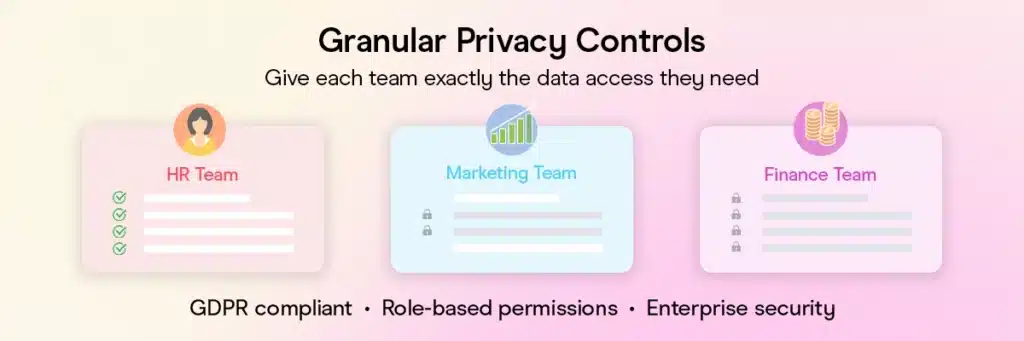
Take control of sensitive attendee data with granular visibility settings and enhanced authentication protocols. Think of this like having different security clearance levels in your organization – you can now control exactly who sees what information.
How it works in practice:
- Your HR team can access attendee personal details for badge printing
- Your marketing team can see registration data but not phone numbers or addresses
- Your finance team can see payment information but not personal details
- You decide whether admin users need to re-authenticate every time or can “trust” their device for 30 days
This helps you comply with GDPR, CCPA, and other privacy regulations without restricting your team’s ability to do their jobs effectively.
Advanced Promo Code & Ticketing System

Say goodbye to awkward situations where your best customers get worse deals due to technical quirks. Our redesigned promotional code system gives you intelligent control over how discounts work together, plus the ability to create hidden ticket tiers.
What’s changed:
Previously, promo codes were applied in creation order, which could mess up your pricing strategy. Now you have sophisticated control – if someone uses both a “VIP15” code (15% off) and an “EARLY25” code (25% off), you can set whether the better discount applies or if they stack properly.
Hidden tickets unlock new possibilities:
Create secret “Platinum” tickets that only appear when someone enters the right promo code, giving you airline-style pricing sophistication.
Enhanced Approval Workflow Management

Eliminate email fatigue and streamline your approval processes with intelligent workflow management. Based on direct user feedback, we’ve redesigned how approval notifications work to reduce inbox clutter while improving process efficiency.
What’s changed:
- Smart email consolidation: All approval requests for a single event now combine into one email instead of multiple individual notifications
- Optional notifications: Choose to opt out of initial approval emails and reminders – manage everything directly in the platform
- Real-time resolution: Once any approver actions a request, it’s immediately marked as resolved and removed from everyone’s reminder queue
- Self-approval prevention: Users can no longer approve tasks they created themselves, ensuring proper process integrity
- Automatic cleanup: Cancelled events automatically resolve all pending approval requests
Fewer emails, clearer workflows, and no more redundant notifications. Your team focuses on what actually needs attention instead of wading through already-completed tasks.
This addresses one of the most common workflow pain points while maintaining the approval oversight your organization needs.
Gevme Omnichannel: Revolutionary Onsite Management
Transforming your event check-in and live engagement into seamless, professional experiences
Enhanced Onsite Operations
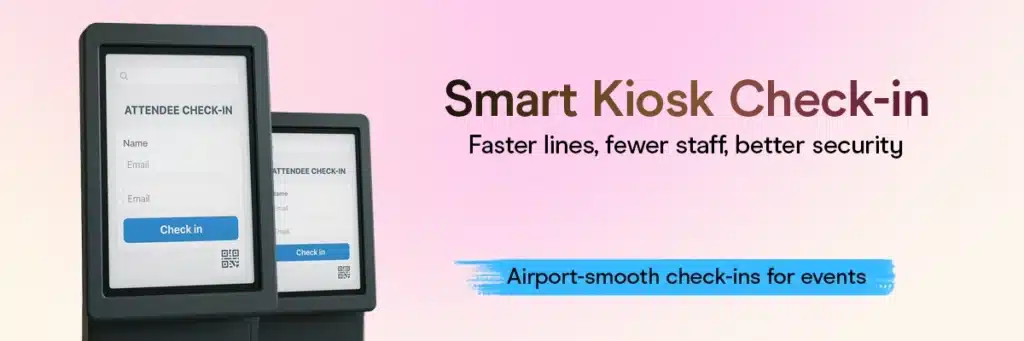
Key improvements:
- Configurable fields: Show “Medical License #” for medical conferences or “Company” and “Booth Interest” for trade shows
- Auto-lock security: Kiosks automatically lock after 2 minutes of inactivity to prevent unauthorized access
- Smart search workflow: Scan a QR code → system finds the person → auto-returns cursor to search bar for the next person (no clicking around)
- Persistent settings: If a kiosk crashes during your event, all custom configurations are preserved
Enterprise-Grade Live Engagement
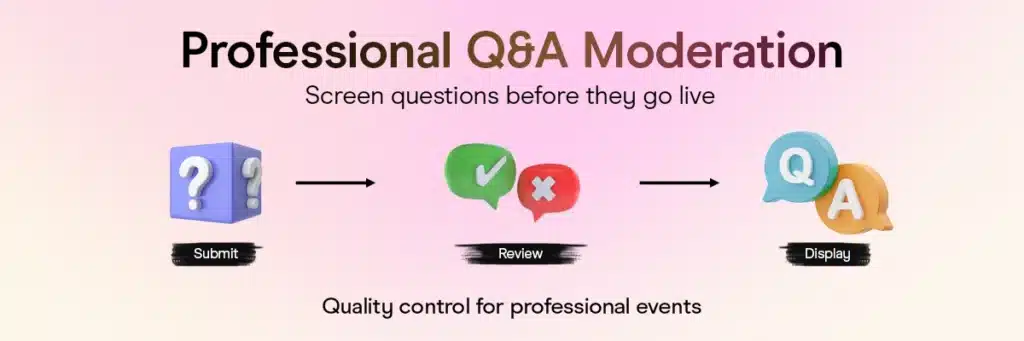
Professional moderation capabilities:
- Q&A screening: Questions submitted during keynotes don’t appear immediately – approve good ones, reject inappropriate ones
- Rate limiting protection: Prevents spam attacks or harassment through meeting request flooding
- Optimized performance: Live features only load when actually being used, so event pages load faster
Flexible Multi-Brand Management

Manage multiple branded experiences from a single platform without conflicts. Perfect for enterprise clients running multiple events or companies with various brand requirements.
Unified management benefits:
- Slug reuse: Use the same logical URL paths across different custom domains without conflicts – for example, you could have “registration” as the path for both techcon.mycompany.com/registration and healthcare.mycompany.com/registration
- Project-level branding: Set default logos, colors, and settings at the brand level – individual events inherit these automatically
- Seamless switching: Move between managing different events from a single dashboard without multiple logins – for example, switch from your TechCon to HealthCare Summit management without re-authenticating
This saves massive amounts of time for enterprise clients while keeping everything organized and properly branded.
Ready to See it in Action?
These updates are already live and built to make your workflows smoother, faster, and smarter. Want a walkthrough or just curious how it fits into your setup?
Book a demo with us, we’d love to show you around.
Spring 2025
Registration
Omnichannel
Registration
Effortless Registration with SingPass Integration
Imagine your attendees not having to enter their details every time they register for an event. It’s now possible. Introducing SingPass integration for Gevme Registration.
SingPass is Singapore’s trusted digital identity system, used by citizens, permanent residents, and foreign pass holders for secure online transactions. Attendees can now log in with their SingPass credentials and auto-fill their details via MyInfo. This means a faster, error-free registration process for users and cleaner, verified data for organizers.
What’s in it for you?
- Frictionless registrations without manual data entry
- More accurate attendee info with pre-verified details
- Minimize fraudulent sign-ups with government-verified credentials
- Reduce administrative workload by collecting reliable attendee data
Custom CSS for Wallet Attendee Forms - More Control, More Branding
You now have full control over the look and feel of your event registration form even in the Gevme wallet of your attendees. With the new Custom CSS setting under Advanced Customization, you can now apply styles on the forms, so your attendee forms are always on brand without modifying core settings.
The injection of these customizations on attendee forms have been optimized to load at a optimum time without compromising the loading speed of the form itself ensuring seamless user experience. This ensures your brand stays on point on and even off your event platforms.
Why it matters
- Apply your own CSS to control form appearance
- Ensure styles load at the right time for a smoother experience
- Standardize attendee forms across multiple events without extra adjustments

Faster, Smarter Self Check-In for Attendees
Attendee self check-in just got a major upgrade. Given the immense data overload a modern attendee goes through, to simplify checking-in at any Gevme powered event, Kiosk Mode on Gevme Registration now supports check-in using any available attendee detail from the Attendee Form, Admin Form, or System Fields so they can quickly locate their records without hassle.
Attendees or Admins can now enter any of the submitted fields for check-in and select the relevant record from the search results to check-in at the event.
What’s in it for you?
- Faster self check-in – Attendees can search by name, email, or any provided detail.
- Smoother experience – Wider dropdowns make selections clearer and easier.
- Better navigation – Optimized layout means quick access to search and check-in options.
Adobe Analytics Tracking Now Available at Organization Level
If you’re already using GTM tracking, you now have another way to capture attendee data. With Adobe Analytics tracking at the organization level, you can embed a single tracking code to monitor attendee interactions across all your events. This means you can now:
- Unify tracking across all events – No need to set up tracking for each event individually.
- Leverage Adobe’s analytics ecosystem – Gain richer insights with Adobe’s built-in reporting and visitor intelligence tools.
- Optimize attendee engagement – Track user journeys, identify drop-offs, and make data-backed decisions to improve future events.
Whether you use GTM or Adobe Analytics, you now have the flexibility to track and analyze event data your way.

Stronger Security, Faster Access with SSO for Backend Users
Backend users can now log in using their organization’s existing authentication system. Instead of juggling multiple credentials, they simply select SSO at login, enter their organization identifier, and get redirected to their company’s secure login page. Once authenticated, they’re instantly granted access, no extra accounts or unnecessary steps.
Why this matters:
- Stronger security – Reduces password-related risks with centralized authentication.
- Simplified access – Log in with your existing credentials, no need to manage another password.
- Faster workflow – Skip manual logins and get straight to managing events.

Omnichannel
Introduction of Search mode for Self check-in on Gevme Kiosks
As a part of our ongoing effort to enhance experience and accessibility for event attendees, we have now implemented a search function across the range of our Check-in Kiosks. Instead of searching for QR codes, attendees can simply type in their name at the check-in kiosks, check in, and print their badge. Once done, they’ll get an email confirmation – quick, simple, and hassle-free.
This helps when people forget their QR codes or don’t have them handy. It also keeps things smooth at busy events. Search results only show essential details to protect privacy, and once someone checks in, they can’t do it again, so no bogus check-ins.
To enable this, turn on Search Mode in your deployment settings and select which fields attendees can search by. It’s off by default, so you’ll need to activate it if you want to use it. Try it out and let us know how it works for you

Native Support for Adobe Analytics Tracking
Gevme Omnichannel has expanded its advanced event tracking capabilities with support for Adobe Analytics. Users can now track attendee interactions across all event pages with a single tracking code. This update allows companies to embed their Adobe Analytics script directly into all attendee-facing pages under their organization for deeper insights into user behavior and event performance.
Previously, event organizers relying on Adobe Analytics had no direct way to track attendee engagement across multiple events within Gevme. Now, similar to GTM tracking, a single script enables seamless tracking across all attendee pages, helping teams analyze visitor behavior, optimize engagement, and make data-driven decisions.
Admins can add their Adobe Analytics script URL at the organization level. Once set up, the script is automatically injected into the <head> section of all attendee pages (public and private, but not in preview mode). This ensures consistent and accurate data collection across events.
Next steps
- Add your Adobe Analytics tracking script to the database, linking it to your organization ID.
- Once enabled, the script runs on all attendee pages, capturing event interactions automatically.
- Use Adobe Analytics to monitor attendee activity, refine event strategies, and optimize engagement.
This update makes it easier to track attendee behavior at scale, giving event organizers more control over their analytics setup.
Secure SSO Login for Backend Users
Omnichannel now supports Single Sign-On (SSO) authentication via Azure AD, making login simpler and more secure for backend users. Instead of juggling multiple passwords, users can now log in with their organization’s existing credentials.
Previously, backend users had to create separate accounts, leading to password fatigue and security risks. With SSO, access is tied to your organization’s security policies, this allows centralized control and a streamlined login process.
How it works
- Select SSO login on the Omnichannel login screen.
- Enter your organization identifier to continue.
- The system redirects you to your company’s SSO login page.
- Once authenticated, you’re logged into Omnichannel—no extra accounts needed. Why This Matters
What’s improved
- Stronger security – Reduces password-related risks with centralized authentication.
- Simplified access – Log in with your existing credentials, no need to manage another password.
- Faster workflow – Skip manual logins and get straight to managing events.
To get started, make sure your organization identifier is set up. If you run into issues, contact your IT team or support.

Improved speaker and session search
Finding the right speaker or session just got easier. We’ve upgraded the search experience to be smarter and more intuitive, so you can quickly get to what you need. Instead of only matching exact names, the search now understands more context, making it easier to find the right people and sessions. You can search for speakers not just by name, but also by their job title, company, or even details from their biography. If you’re looking for sessions, you can now search by session title, description, tags, speaker name, job title, or company, ensuring more relevant results.
Previously, search results were limited. A speaker search would show their sessions but not necessarily all co-speakers in a panel. Finding sessions required knowing exact titles. Now, the search is broader and smarter, returning results that actually match what you’re looking for. This applies both on live event pages and in the admin panel, helping attendees discover the right content faster and making it easier for organizers to manage.
What this means for you:
- Faster event check-ins – No more searching for QR codes, just type in your name.
- Smarter session & speaker search – Find what you need, even without exact names.
- Better event experience – More intuitive search, fewer barriers for attendees.
Try it out by searching for speakers and sessions on your event’s live page or in the admin panel. Simply enter relevant keywords, like a speaker’s job title or a session topic, and see how the improved search delivers better results. If you have feedback or notice anything unexpected, let us know.
Event participation report for onsite insights
Not everyone who registers actually shows up. The new Event Participation Report helps you identify absentees across sessions, giving you the data you need for better follow-ups and engagement strategies.
What’s new?
- Session selection: View absentees for specific sessions or across the entire event.
- Filters & sorting: Apply the same filters and sorting options as the Event Attendees Report.
- Custom report settings: Choose which fields to include, update report titles, and refine your data view.
- Export capabilities: Download reports for deeper analysis and follow-up planning.
- Faster report generation: Improved processing speeds ensure quicker access to attendee data.
Understanding attendance patterns helps you fine-tune event experiences, re-engage no-shows, and strengthen future outreach. This report gives you direct, actionable insights to improve event impact. Plus, with faster loading speeds and enhanced reporting, you get the insights you need without the wait.
Find the Event Participation Report in the Onsite Reporting Tool today.

Spark
Agent Studio: Your AI, Your Way

Event teams need AI that works the way they do, not rigid tools that force them to adjust their workflows.
We built Agent Studio to give you control, so you can create AI agents that fit your needs without writing a single line of code.
AI is no longer a one-size-fits-all solution. Now, you decide what it does, how it works, and how it helps you get more done.
What’s new?
- Build your own AI agents – Customize workflows with specific inputs, outputs, and AI models.
- Simplified experience – Moving from “tasks” to “agents” makes AI easier to use and tailor to your needs.
- Flexible AI models – Choose from GPT-4, Claude 3.5, and more, fine-tune them for better results.
- Seamless integration – Works smoothly with existing Spark features. Enjoy a cohesive experience across the platform.
- Venue search with destinAItor: Simplifies event planning by providing accurate, AI-enhanced destination insights. Makes planning and managing events easier.
Pre-built or custom, your choice
You can now get started faster with pre-built AI agents in Spark Studio – no setup needed. Just pick one that fits your workflow.
Need to turn post-event feedback into a structured report? The Post-Event Report Generator does the heavy lifting for you. Looking for fresh ideas? The Event Theme Brainstormer suggests trending concepts based on industry insights.
If sponsorship is on your radar, the Sponsorship Prospecting Agent helps you find potential partners that align with your audience. And when it’s time to budget, the Budget Estimator provides real-world cost projections, so you’re not just working with rough estimates.
There’s more. You can analyze survey responses, compare vendor proposals, research event destinations, create attendee personas, and even repurpose content for social media. Analysis, brainstorming, business development, content creation, event planning, or operations – there’s an AI agent ready to help.
You can use these agents as they are or customize the workflow to match your needs.
How workflows work
Every AI agent in Agent Studio follows a structured workflow of three steps.
1. Input
Define what information the AI needs to function. Agent Studio supports:
- Custom fields: Text, Paragraph, Number, Dropdown, File Upload
- System fields: Tone, Language selection, Output word limit
- Knowledge items: Upload files, links, or text to train the AI on specific topics
2. Processing & decision-making
This is where things get juicy. Agent Studio lets you decide which AI model or operator best fits your task. You can:
- Choose from multiple AI models, including OpenAI’s GPT-4, Anthropic’s Claude Sonnet 3.5, Gemini, and specialized models like DestinAItor (great for venue research)
- Integrate web search for real-time information retrieval
- Make use of trainable data to fine-tune AI responses based on past interactions
- Adjust AI temperature to control creativity vs. accuracy
3. Actions & output
Once the AI processes the input, it delivers the final output in a format that suits your workflow. Actions include:
- Generating summaries, reports, and recommendations
- Sending data to external platforms
- Triggering manual or automated follow-ups
Agent Studio use cases for event teams
- Faster post-event reports, without the manual work
- Find the right sponsors without endless research
- Build an agenda that aligns with industry trends
- Extract key insights from survey feedback
- Compare vendor proposals in seconds
- Plan your budget with real data, not just estimates
- Find speakers your audience will love
- Keep your documents in sync, without manual checks
- Build your own AI agent to handle unique tasks

With Agent Studio, we want to make AI more useful for the event tech industry. Right now, scattered and inaccurate data often leads to unreliable results. But events are about real people and real connections, so AI should actually help, not cause more confusion. That’s why we’re building a flexible AI workflow tool that uses the best LLMs while staying grounded in accurate data. This way, AI can finally become a reliable partner for event teams.
Winter 2024
Registration
Omnichannel
Registration
Enhanced Reporting: Improved Efficiency and Security
We’ve made several updates to streamline how reports are generated and accessed while ensuring your data remains secure. Here’s what’s new:
- Faster Report Processing with NodeJS and Multi-Core CPU Support
Reports like orders, surveys, and transactions now utilize NodeJS with multi-core CPU support. This allows multiple tasks to run simultaneously, reducing delays and enabling faster report generation even during high data loads. This helps users save time when working with large datasets or generating multiple reports at once. - Batch Processing for Large Datasets
Instead of handling entire datasets at once, reports are now generated in smaller, manageable batches. This prevents system slowdowns and ensures smoother processing, especially for complex or large-scale reports. Users can now enjoy consistent performance and fewer errors during heavy reporting tasks.
- Data Caching for Faster Access
Frequently accessed report data is now stored temporarily, allowing you to retrieve it without reprocessing. This significantly reduces the time needed to access previously generated reports. This enables users to quickly revisit reports without waiting for them to reload or regenerate.
- Enhanced Security with Session Expiry and CSRF Protection
We’ve added session expiration to ensure that unauthorized access is prevented after periods of inactivity. Additionally, CSRF protection safeguards your data by preventing unauthorized requests. Now work confidently knowing your sensitive data is protected.
Enhanced Email Credibility and Standardization
- Default Masthead and Footer for Credibility
All emails now include a default masthead (e.g., “Singapore Government emails are sent from gov.sg addresses”) and footer (e.g., “gevme.com is used by <agency name> as the official platform to manage <event name>”). This reinforces the authenticity of your communications and minimizes the risk of being flagged as phishing. This update builds recipient trust and ensures email deliverability. - Organization-Level Configuration
Admins can set masthead and footer content centrally via the Organisation Details page. These settings automatically apply to all email templates, ensuring consistency. Admins can also edit the content with a user-friendly content editor. This update simplifies setup and ensures brand alignment across emails. - Flexible Non-Admin Options
If enabled by admins, non-admin users can exclude the masthead or footer for specific emails directly from the backend event organizer view. This update provides controlled flexibility for unique email needs while maintaining oversight. - Comprehensive Template Support
Mastheads and footers are rendered across all templates, including archived and customized ones, ensuring uniformity in email previews and final outputs. This update guarantees consistency in all communications, regardless of template origin.
Data Sync Between Gevme and Salesforce
- Event Data Synchronization
Automatically sync event details from Gevme to Salesforce campaigns, ensuring event information is always up-to-date in Salesforce. This update simplifies campaign setup in Salesforce and ensures data consistency. - Attendee Data Synchronization
Sync attendee details (creation and updates) to Salesforce as leads or contacts, maintaining a one-to-one mapping between Gevme attendees and Salesforce records. This update provides an accurate, unified view of attendees, supporting targeted follow-ups and insights. - Waiting List Data Synchronization
Waiting list details are now synced automatically to Salesforce, ensuring all attendee-related data is captured. This update enhances lead nurturing by including potential attendees from waiting lists. - Error Handling and Logging
Integration includes accessible logs via the Gevme backend, enabling users to monitor synchronization issues. This update facilitates quick troubleshooting, ensuring seamless data flow. - Field Mapping Customization
Key fields such as attendee status, ticket numbers, and more can now be mapped between Gevme and Salesforce. This update ensures data accuracy and relevance by aligning field definitions across platforms. - Flexible Configuration
The integration supports both organization and event-level configurations for Salesforce API, with options for error monitoring and manual sync for specific events. This update provides granular control, allowing organizations to tailor integration settings to their unique workflows.
Enhanced Checklist Approval System for Improved Notification Management
To address the issue of email overload in the checklist approval process, we’ve introduced several enhancements that streamline approvals and improve user experience.
- Consolidated Notifications
Approval notifications are now bundled into a single email per event, reducing clutter for approvers. Similarly, in-app notifications have been grouped at the event level for streamlined tracking. This update makes approvers receive fewer, more actionable notifications, enhancing clarity and reducing distractions. - Opt-Out Functionality
Users can now opt out of receiving email notifications directly through their settings. This update empowers users to manage their notification preferences, improving flexibility and reducing unwanted emails. - Self-Approval Prevention
A new organization-level setting enables admins to block self-approvals in workflows unless specifically configured for testing purposes. This update increases accountability and ensures the integrity of approval workflows.

Omnichanel
Simplified Session Import: A Smarter Way to Build Agendas
Gone are the days of manually entering session details into Omnichannel. The new Import Sessions feature transforms how event agendas are managed, offering a faster, more reliable alternative to traditional methods.
From Manual to Seamless
Previously, setting up event sessions required tedious data entry, leading to inefficiencies and potential errors. With this update, users can upload a preformatted file directly through the Agenda module. A built-in review process ensures all imported details are accurate before confirmation, simplifying the workflow significantly.
Why It Matters
This enhancement brings substantial upgrades:
- Efficiency: Bulk imports save valuable time, allowing event teams to focus on planning and creativity.
- Accuracy: Automating data entry reduces errors, ensuring agendas are error-free.
- Scalability: Handle simple or complex agendas for events of any size with ease.
This streamlined process elevates the overall event planning experience, making it more efficient, scalable, and error-proof.
Effortless Bulk Session Management in Omnichannel
Managing event agendas has never been easier with the new Bulk Session Selection and Deletion feature, designed to save time and enhance efficiency for event organizers.
A Streamlined Workflow
Previously, session management required updating or deleting sessions individually—a repetitive and time-consuming task for large events. Now, you can select multiple sessions using intuitive checkboxes on the session listing page. Apply actions such as deletion instantly via a centralized bulk action menu, simplifying the entire process.
Elevating Event Planning Efficiency
This feature reduces manual effort and speeds up workflows, especially for complex or last-minute agenda adjustments. By enabling mass updates, it minimizes errors, helping event teams focus on delivering exceptional event experiences.
This update is part of Omnichannel’s commitment to making session management smarter, faster, and more user-friendly.
Exhibitor Portal Enhancements
- Updated Domain Access
The Exhibitor Portal is now accessible via the new link: https://exhibitor.gevme.com/. This change allows both the admin side and the Exhibitor Portal to be accessed in the same browser window, eliminating previous access restrictions and streamlining the user experience.
- Improved Mobile Responsiveness
The portal is now optimized for mobile devices, ensuring that exhibitors can efficiently manage their profiles and data, whether on a phone or tablet. This improves usability across all device types, providing a seamless experience.
- Search Functionality
A new search feature has been added to the Exhibitor Portal. By navigating to the company listing screen and using the search bar, exhibitors can quickly find specific companies by name or relevant keywords. This saves time by eliminating the need for endless scrolling and enhances productivity.
Enhanced Privacy Controls for Mini Experience
The Mini Experience now includes advanced privacy options, allowing users to tailor their privacy settings for a more secure and personalized experience.
A Customizable Privacy Framework
With this update, users can navigate to the settings page, where they can customize their preferences. Whether you want to limit data visibility or adjust sharing permissions, the process is now intuitive and user-centric.
Benefits for a Tailored Experience
This enhancement empowers users to manage their privacy effortlessly, ensuring that only essential details are shared. By offering flexibility and control, the Mini Experience fosters confidence, helping users engage with the platform on their terms.
Omnichannel continues to prioritize user trust and personalization, creating safer, more adaptable experiences.
Transform Your Content with the New RichText Accordion Format
The latest update introduces an accordion display option for RichText blocks, offering a more interactive and structured way to present detailed content.
Enhanced User Experience
This feature is perfect for dense information like FAQs, event schedules, or speaker bios. It reduces clutter and makes navigation seamless, ensuring users can access the content they need without feeling overwhelmed.
Why It Matters
Interactive layouts like this elevate content presentation, keeping users engaged while maintaining a professional and polished aesthetic.
Efficient Badge Management with Badge Mirroring and Extensions
The Badge Mirroring update takes badge customization to the next level by allowing you to replicate badges for different events or attendees, making the process faster and more consistent.
How This Upgrade Improves Badge Creation
Previously, creating individual badges for every event or attendee could be time-consuming and repetitive. With the mirroring feature, you can now easily create multiple badges that share the same layout and details with just a few clicks.
Why It Matters
This update saves time and ensures uniformity across all event badges. It’s especially beneficial for large-scale events, where attendees or participants may require similar badge information. With this new functionality, you can now focus more on other aspects of event planning, while badge management becomes a streamlined, automated process.
Enhanced Custom Reporting with Session Filters
The Sessions in Custom Report Filters update significantly enhances your ability to create tailored reports by enabling the inclusion of session-specific data. This new feature allows you to filter and report on sessions, offering deeper insights into your event’s performance.
How This Improves Reporting
Now, with session filters integrated into custom reports, you can create more detailed and focused reports directly within the platform.
Why It Matters
This functionality streamlines data analysis and allows you to track session engagement, attendance, and other metrics effortlessly. Whether for post-event reviews or real-time adjustments, you now have more control and accuracy when analyzing specific sessions, making your event management process more efficient and data-driven.
Streamlined Access with SSO Authentication for Backend Users
The introduction of Single Sign-On (SSO) for backend users simplifies and secures the login process, allowing for more seamless access to the platform.
How This Improves User Access
With this update, users can now log in using a single set of credentials, eliminating the need to remember different passwords for different systems.
Why It Matters
This new feature boosts both security and convenience. By reducing password fatigue, it enhances the user experience and ensures quicker, more secure access to the platform. Additionally, the integration of SSO helps your organization streamline access control, making it easier to manage user permissions and safeguard sensitive information.
Spark
Spark + Vimeo: Effortless Video Content Repurposing
Direct Vimeo Integration for Broader Support
One of Spark’s standout features is the ability to repurpose recorded videos into actionable, shareable content. Previously, Spark supported video imports from YouTube. Now, with the addition of direct Vimeo integration, users can seamlessly connect their Vimeo accounts to Spark.
Key Capabilities with Vimeo Integration:
- Effortlessly import videos for analysis.
- Extract actionable insights and generate summaries.
- Download captions in over 30+ languages to create multilingual content.
This update expands Spark’s versatility, allowing event organizers, marketers, and content creators to quickly transform their long-form Vimeo videos into easily digestible assets like snippets, multilingual subtitles, or key takeaways. It streamlines workflows, making content repurposing faster, smarter, and more inclusive.
Spark + Snapsight: Real-Time Content Repurposing
Snapsight captures live session content, analyzes it, and generates key takeaways and summaries in real-time. With Spark‘s integration, event teams can now repurpose this content into various formats such as social media posts, blogs, and press releases. This integration allows teams to instantly turn Snapsight’s insights into shareable content. How It Works
For example, during a session, Snapsight captures and analyzes key moments, providing instant insights. Spark, using these insights, then helps create different content formats, making it easier to engage attendees across multiple platforms immediately after the event.
Benefits:
- Instant Content Repurposing: Repurpose summaries into various formats, saving time.
- Faster Engagement: Share valuable post-event content across different channels with minimal delay.
- Improved Reach: Enhance event visibility by repurposing content for blogs, social posts, and more.
Enhanced SparkChat for File-Based Analysis
SparkChat has been significantly enhanced to support direct file uploads for instant processing. This upgrade allows users to analyze various file types—be it documents, contracts, or datasets—by simply uploading them into the system. Powered by Large Language Models (LLMs), SparkChat can now evaluate, compare, and extract insights from these files using custom user prompts, a feature that wasn’t previously possible.
Why This Wasn’t Possible Before
Earlier, SparkChat lacked the ability to handle direct file inputs efficiently. The integration of advanced LLMs and new backend processing capabilities now makes it possible to analyze uploaded content on the fly. These improvements ensure a more robust, scalable solution for analyzing complex files in real-time.
How SparkChat Stands Out
Unlike other GPT-based tools that typically require structured inputs or are limited to basic text parsing, SparkChat offers an advanced context understanding of various document types. This allows for more nuanced analysis, making it better suited for tasks such as contract evaluation or detailed data comparison. The ability to handle varied file types and run sophisticated analyses gives SparkChat a competitive edge in flexibility and depth.
Outcome
These enhancements make SparkChat an even more integral tool for teams looking to quickly derive actionable insights from their files, improving efficiency across creative, analytical, and evaluative tasks.
Expanded Language and Model Support
- Spark now supports Arabic, enabling content to reach a broader, global audience. Arabic language support was a critical addition due to its complexity and script-based challenges, which required additional processing capabilities to ensure accurate content analysis.”
- In addition to Arabic, Spark generates captions in over 30 languages, allowing teams to cater to diverse audiences worldwide and expand their reach.
- We’ve integrated the latest versions of GPT-4, Claude 3.5, and other cutting-edge language models, enabling Spark to provide faster, more accurate, and context-aware outputs. These advancements improve everything from content repurposing to nuanced analysis.
- The combination of new language support, particularly Arabic, and advanced AI models, ensures Spark can tackle a wider array of tasks and provide results that are both globally accessible and technologically superior.